This page collects the facts you look up: every setting of Advanced Permissions Management, the roles and permission sets, what APM does not do, and how it compares with the standard change log of Business Central.
¶ APM settings reference
The Advanced Permissions Management Setup page holds all settings of Advanced Permissions Management (APM). The defaults suit most environments, and you can change them at any time. For installation and the wizard, see Install and set up.
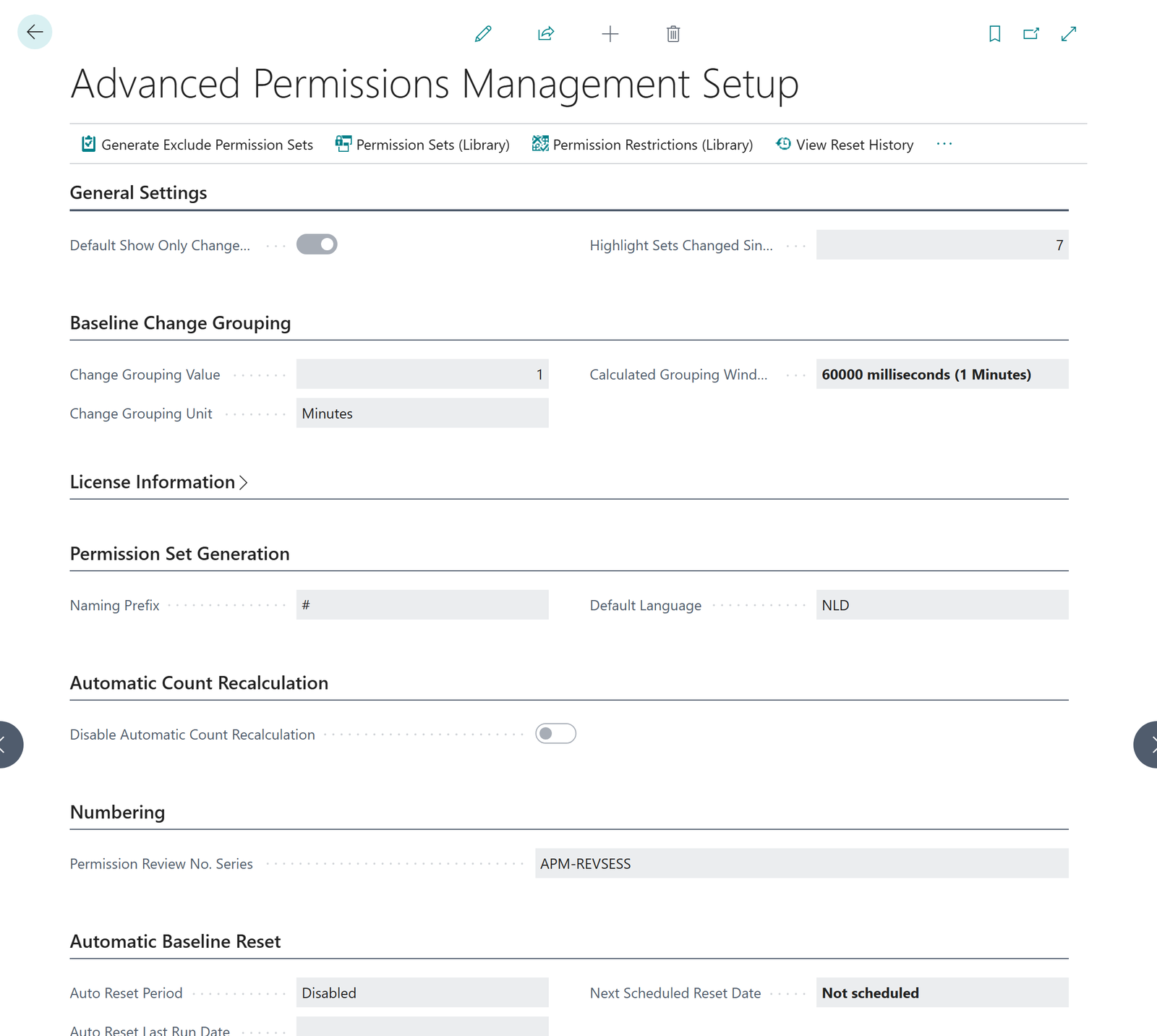
¶ Settings by fast tab
| Fast tab | Field | What it does | Default |
|---|---|---|---|
| General Settings | Default Show Only Changed Lines | Whether Version Compare opens showing only the changed lines. | On |
| General Settings | Highlight Sets Changed Since (Days) | How long a recently changed set stays highlighted on the dashboard. Minimum 1. | 7 |
| Baseline Change Grouping | Change Grouping Value | How close together edits must be to count as one change moment. A small window suits detailed audits, a larger one reduces noise. Whole number from 1 to 999. | 1 |
| Baseline Change Grouping | Change Grouping Unit | Seconds or minutes. | Minutes |
| Baseline Change Grouping | Calculated Grouping Window | Read only. The resulting window in milliseconds. | Calculated |
| License Information | Status | Not Registered, Trial, Contract, or Trial / Contract finished. Read only. | Not Registered |
| License Information | Registration Date, Trial Expires On, Contract Start Date, Contract End Date | Dates of your registration, trial and contract. Read only. | From the registration service |
| License Information | Last License Check Error | The reason when the last license check failed. Read only. | Empty |
| Permission Set Generation | Naming Prefix | Prefix for the code of generated permission sets, up to 10 characters. | 2C- |
| Permission Set Generation | Default Language | Language of the names of generated permission sets. | English |
| Automatic Count Recalculation | Disable Automatic Count Recalculation | Every change is always logged in full. This only stops the automatic recalculation of the counters on every edit, which can help in very large environments. Refresh Permission Set Version and Check for App Changes recalculate on demand. | Off |
| Background Job | Status, Runs as user, Last run | Read only. Whether the hourly app-update job is scheduled and able to run, the user it runs as, and its last run. The action Schedule Background Job schedules the job as you. | Running |
| Numbering | Permission Review No. Series | Number series for permission reviews. | APM-REVSESS (RS-00001 and up) |
| Automatic Baseline Reset | Auto Reset Period | Optional automatic baseline reset: monthly, quarterly or yearly, on the first or the last day, or a custom date formula. Needs a license. | Disabled |
| Automatic Baseline Reset | Auto Reset Date Formula | Visible when the period is Custom. Enter your own formula, for example <1M>. |
Empty |
| Automatic Baseline Reset | Auto Reset Last Run Date, Next Scheduled Reset Date | Read only. When the last automatic reset ran and when the next one is due. | Empty |
¶ Actions on the setup page
| Action | What it does |
|---|---|
| Generate Exclude Permission Sets | Starts the permission set generator. |
| Permission Sets (Library) | Shows and lets you change the predefined and custom permission set library behind the generator. |
| Permission Restrictions (Library) | Shows and lets you change the sensitive and ledger object ceilings applied to wildcard permissions. |
| View Reset History | All baseline resets with their archive counts. |
| View Period Changes | Changes across a date range, including data archived by earlier resets. |
| Check for App Changes | Runs the check for changes caused by app updates now. |
| Load Default Data | Loads or refreshes the permission library and the default quality rules. |
| Register, Request License, Refresh License Information | See License and registration. |
| Initial Snapshot - Full Reset | Starts over completely. See the warning below. |
¶ Initial Snapshot - Full Reset
You find this action under ... > Actions on the setup page. It is not promoted in the ribbon, on purpose.
Initial Snapshot - Full Reset deletes your audit trail and cannot be undone. It removes all tracked changes, snapshots, archives and reviews of the app and takes a completely new baseline. Your real permission sets, users, license, setup and the permission set library are not touched. Use it only when you have been advised to. To start a new period and keep the history, use a baseline reset.
¶ APM roles and permissions
Advanced Permissions Management (APM) is a tool for people who control permissions, so it is worth getting its own permissions right. This page lists who needs what.
¶ Overview
| Who | Needs | For |
|---|---|---|
| The person who sets up the app | The SUPER permission set | Install, run the wizard, register, change settings. |
| Everyone who works with the app | The permission set Use Advanced Permissions Management | Open the dashboard, history, reviews, what-if and quality checks. |
| Anyone who rolls back, copies, imports or restores permission sets | Permission in Business Central to change permission sets, for example SUPER or SECURITY, plus Use Advanced Permissions Management | Rollback, and the license-only copy, import and export of permission sets. |
| Users who only record with the Recorder | The permission set Use Advanced Permissions Rec. | See the Advanced Permissions Recorder. Not needed for APM. |
Use Advanced Permissions Management includes the permissions of Compliance Essentials that the app needs. You do not have to assign anything else for APM itself.
¶ Why SUPER for setup
Registration, the setup wizard and changes to the settings affect the whole environment, including the recording of every permission change. The reminder to register also appears for users with the SUPER permission set when they open the Role Center.
¶ Rollback and copy need more than the APM permission set
APM does not give anyone the right to change permission sets in Business Central. The rollback wizard and the copy, import and export actions change permission sets, so the person who uses them also needs that right in Business Central. Without it, Business Central refuses the change. This is deliberate: APM works next to the standard permission model and does not replace it.
¶ Separation of duties
A review is evidence that someone looked at the changes. That evidence is stronger when the person who looked is not the person who made the changes.
Tip: Let one person or team edit permission sets, and let another person complete the reviews. Both need Use Advanced Permissions Management. Only the editor needs the right to change permission sets in Business Central.
Because APM records the user name of every change, you can always see afterwards who made a change. See Audit and evidence.
¶ Assign the permission set
- In Business Central, open the user card of the person.
- Add the permission set Use Advanced Permissions Management to the user's permission sets.
Or, for several users, open Permission Set by User from the Administration & Security group on the APM main list.
¶ What APM does not do
A tool you can trust is a tool whose limits you know. This page says plainly what Advanced Permissions Management (APM) does not do, so you can plan around it and explain it to an auditor.
¶ It records, it does not stop
- It does not block a change. Business Central cannot hold back a permission change until someone has reviewed it. A change is already live when APM shows it. A review is an evidence record, not a gate.
- It does not change how permissions are evaluated. APM works next to the standard Business Central permissions.
- It does not look back before the baseline. APM records from installation. Changes made earlier are not in the trail. Install before the audit period you want to cover.
¶ What it records
APM records changes to permission sets, to the permission lines in them, and to the include and exclude relations between sets. It also records changes that an app update makes to system permission sets, which standard Business Central does not log.
¶ Assignments are counted, not reviewed
Which users hold which permission set is shown as a number per set, and the what-if analysis counts the users that a change would reach. A change of an assignment, for example adding a user to a permission set, is not an item in the Change Explorer and not part of a period review.
In release 7.2, assignment changes are not offered as evidence in the app. A view for them is planned as a feature.
¶ Rollback has a narrow scope
- It works for user-defined permission sets only. System permission sets are read-only in Business Central.
- It restores permission lines and relations. It does not undo a rename, and it does not change which users have the set.
- There is no separate undo for a rollback. Run the wizard again and pick another version.
See Rollback.
¶ Analysis is advice, not a verdict
- The what-if analysis never makes the change. You make it in Business Central afterwards.
- The quality check is rule-based, not artificial intelligence. It finds known patterns. A set without findings is not proof that it is right for your organization.
- Generated permission sets and Copilot names are suggestions. You review and test them before use. See Permission set generator.
¶ License limits
The pages need a registered trial or a license, and some functions need a license. See License and registration.
¶ Volume
APM is built to keep every change in full. In very large environments the automatic recalculation of the counters on every edit can become expensive. The setting Disable Automatic Count Recalculation stops it, and Refresh Permission Set Version recalculates on demand. It never affects what is logged. See the settings reference.
2-Controlware does not publish measured limits for the number of permission sets, changes per day or the size of the history. Test with your own data volume in a sandbox before you go live.
¶ APM compared with the standard change log
Business Central already logs some permission changes. This page shows what that covers, what Advanced Permissions Management (APM) adds, and what stays the same. It makes only claims that we can stand behind.
¶ The comparison
| Question | Standard Business Central | With APM |
|---|---|---|
| Are changes to permission sets that you created yourself logged? | Yes. The log is technical and not built for review. | Yes. Recorded automatically, readable per set and per person, with the permissions before and after. |
| Are changes to system permission sets logged, for example when an app update changes one? | No. They are not logged at all. | Yes. Recorded as an App Update change. |
| Can you compare two versions of a set side by side? | No. Standard Business Central cannot compare versions of a set. | Yes, with Version Compare between any two points in time. |
| Can you mark changes as reviewed and keep that as a record? | Log entries have no review status. | Yes. Each change is Open, Reviewed or Flagged, with a comment, in a period review. |
| Can you see who is affected before you change a set? | Not as a simulation of a proposed change. | Yes, with the what-if analysis. |
| Can you restore an earlier version of a set? | Not in one step. | Yes for user-defined sets, with a preview. |
| Can you stop a change until it is reviewed? | No. | No. A review is an evidence record, not a gate. |
¶ What stays the same
- Business Central evaluates permissions as it always did. APM does not add a permission layer.
- You keep editing permission sets in the standard Business Central pages. APM watches and records those edits.
- Permissions, roles and assignments are still managed with the standard tools.
¶ When the standard log is enough
If you have a small number of permission sets, no audit requirement for permission changes, and no app updates that matter to you, the standard log may be enough. APM is for the situation where you must be able to show, for a period, what changed, who did it and what was concluded.
Last reviewed: October 2026.