Permission sets include other permission sets, so one small change can reach much further than you expect. The cheapest moment to find an unwanted side effect is before the change, not in an incident afterwards. The what-if analysis in Advanced Permissions Management (APM) simulates a change on a permission set and tells you who would be affected.
The what-if analysis needs a registered trial or a license. See License and registration.
Transcript of this video
Advanced Permissions Management. What-if impact. Permission sets include other permission sets, so one small change can reach much further than you expect. Take access to items away from this lookup set, and who will feel it? Without a simulation, you can only guess. Open the what-if analysis on any permission set. Try a change on its permission lines, without touching the real set. Here we remove read access to items. The proposed change is listed, and nothing is saved. Analyze, and the answer comes in plain language. Nine permission sets and four users can be affected. Expand the impact, and you see exactly which sets and which users, with the permissions before and after. Decide with the facts, not after the users call. Know the impact before you change anything. Advanced Permissions Management, by 2-Controlware. Try it for thirty days.
Video (1 minute): remove a permission from a lookup set and see that nine permission sets and four users can be affected.
¶ Why one edit reaches so far
A permission set can include other sets, which gives it all their permissions, and exclude sets, which takes their permissions out of the effective result. When you change a set, every set that includes it changes too, and so does every user who holds one of those sets.
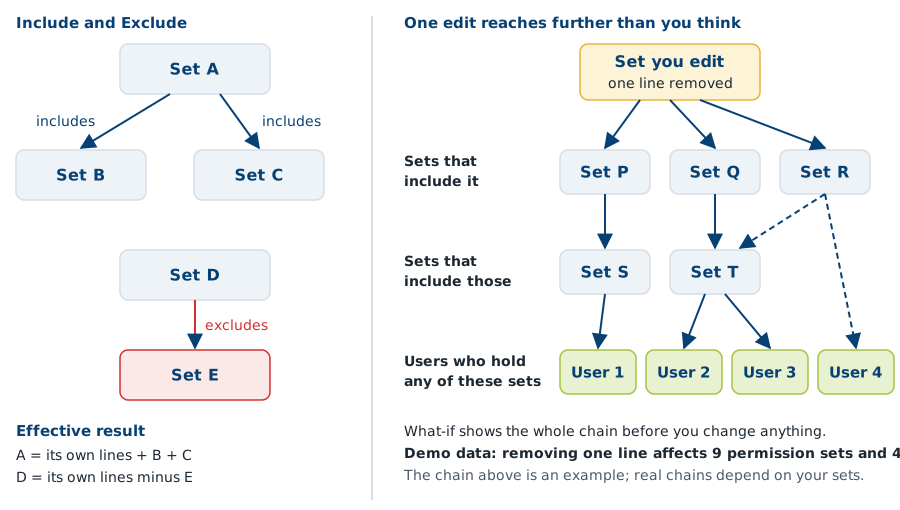
In words: set A includes sets B and C, so its effective permissions are its own lines plus those of B and C. Set D excludes set E, so its effective permissions are its own lines minus those of E. If you remove a line from a set that many other sets include, the effect travels through the whole chain. In the demo of the video, removing one line affects 9 permission sets and 4 users.
¶ Test a change
- On the Advanced Permissions Management list, select the permission set and choose What-if Impact.
- Stage your change. Add a line (New Line), change the permissions on a line, remove a line (Delete Line) or change an Include or Exclude relation.
- Choose Analyze Impact.
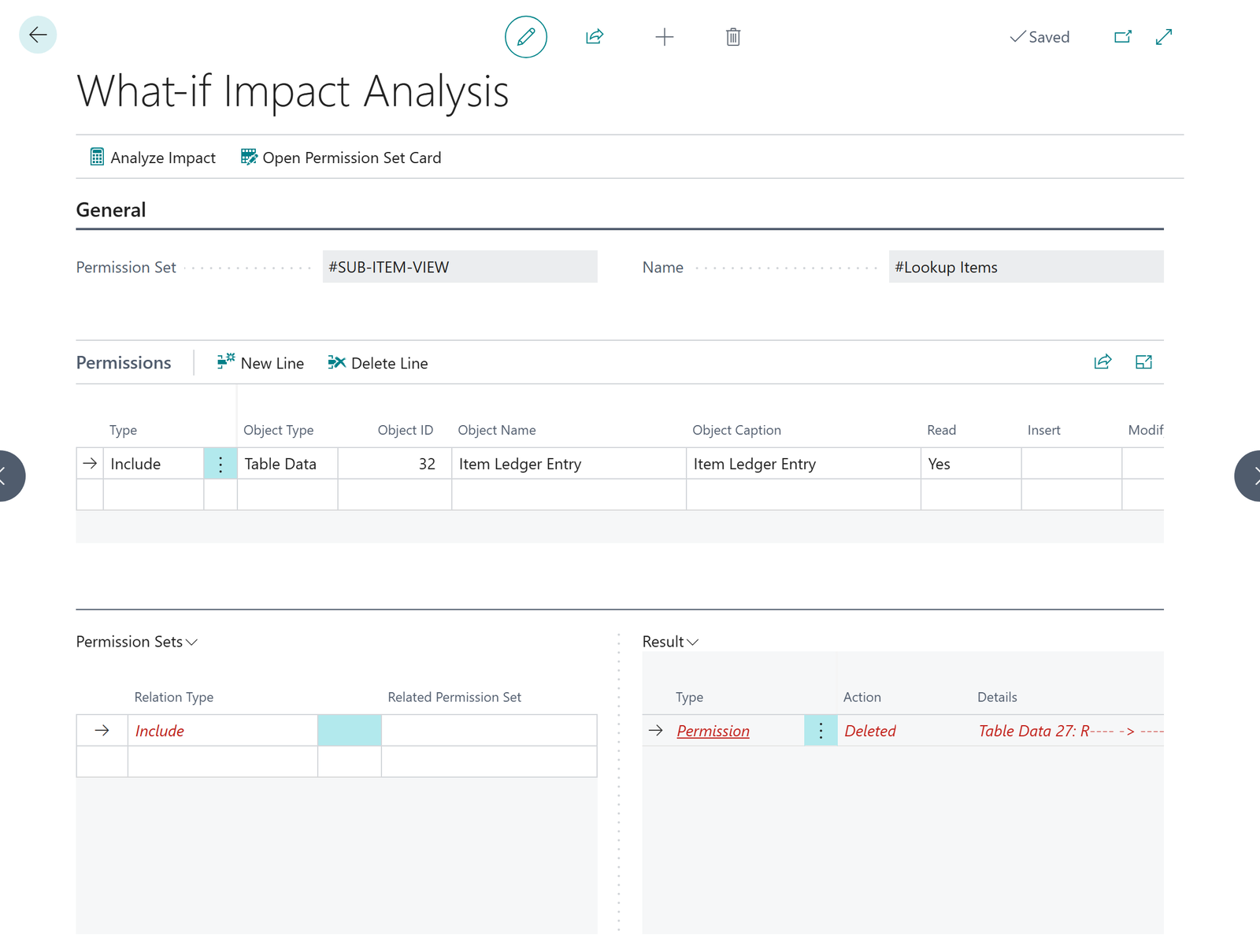
Proposed lines only accept permissions that exist for the object type. Table data lines take Read, Insert, Modify and Delete. Every other object type takes Execute only.
¶ Read the result
The result starts with a summary in plain language, such as "9 permission sets and 4 users can be affected". Under Impact you see every affected permission set with its effective permissions before and after, and every affected user. The analysis follows the whole inheritance chain: every set that includes the target set, directly or through other sets. The Impact section is collapsed until you open it.
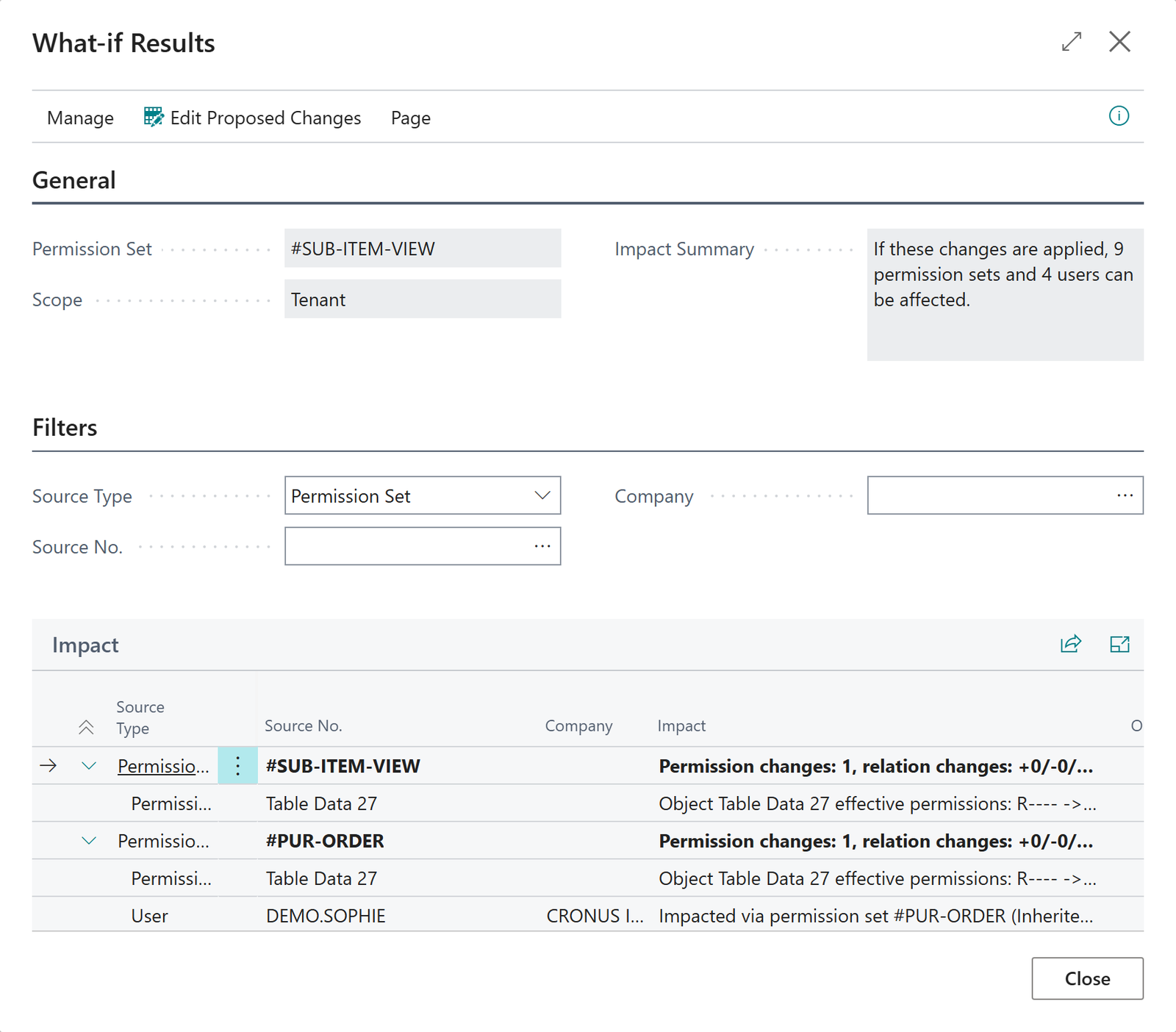
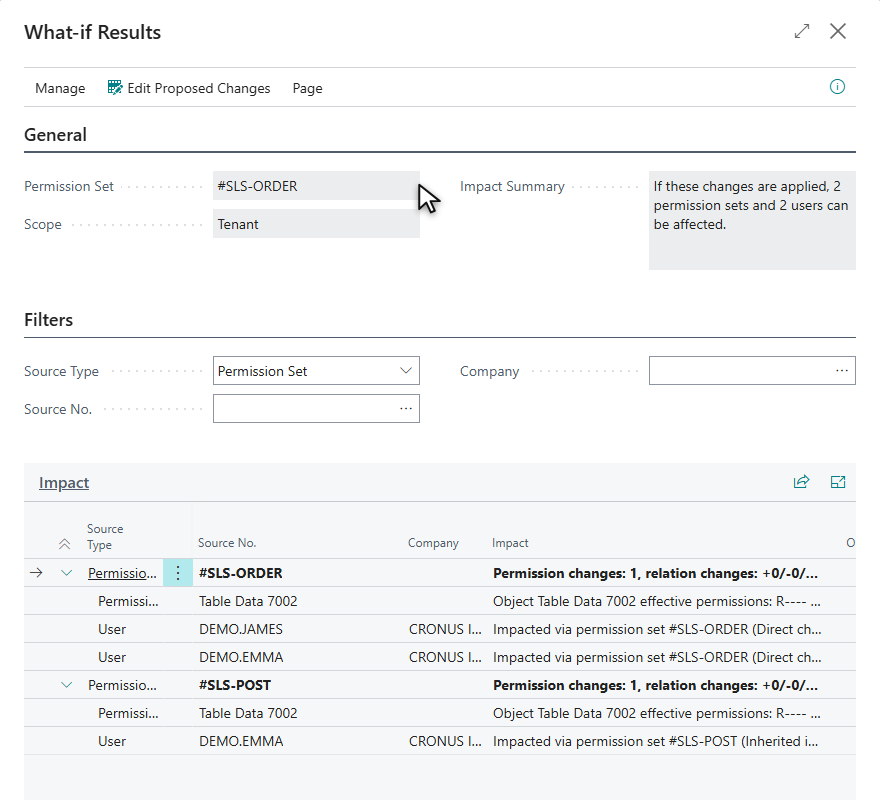
What-if Results with Impact expanded: per permission set the changed object, and under it the users who are affected, with the way the set reaches them.
¶ What to do with the result
- Few sets and users, and all of them expected: make the change.
- Many sets or users, or someone you did not expect: change a more specific set instead, or tell the affected people first.
- Not sure about a set in general: run a quality check.
¶ Good to know
- A what-if analysis never changes anything. The proposal exists only in the dialog and is discarded when you close it. Make the real change in Business Central afterwards, for example in the standard permission set page.
- The one function in this area that writes data is the cleanup action. It removes empty permission lines and relations to sets that no longer exist from one of your own (user-defined) sets. It needs a license.
- To undo a change that was already made, see Rollback.
¶ Quality checks for permission sets
The quality check in Advanced Permissions Management (APM) flags the patterns auditors look for, such as unrestricted access, delete without read and mixed duties, without anyone having to read every permission line. The checks are rule-based and not artificial intelligence, so the same input always gives the same result.
The quality check needs a registered trial or a license. In a trial, a batch run analyzes at most 5 sets. See License and registration.
Transcript of this video
Advanced Permissions Management. The quality check. Which of your permission sets carry too much risk? Reading thousands of permission lines by hand is not realistic. So pick the sets, and let the quality check read them for you. The checks follow fixed rules. It is rule-based, not artificial intelligence, so the same sets always give the same answer. This legacy set is critical. It grants write access to every table, including delete, and nothing limits it. Open the details, and every finding is explained per object. The wildcard line, in red, is the critical one. This base layer is broad too, but it is only a warning. Exclude relations carve the sensitive tables out of it, and you are asked to verify them. One critical finding, and seven warnings, each one explained. Start where the risk is highest. Find risky permission sets in minutes. Advanced Permissions Management, by 2-Controlware. Try it for thirty days.
Video (1 minute): a critical legacy set, a broad but scoped set, and the findings explained per object.
¶ Check one permission set
- Select a permission set on the Advanced Permissions Management list and choose Analyze Set Quality.
- Read the findings per object. Switch on Show findings only to hide the clean lines.
- Choose Permissions to open the set and fix what you found.
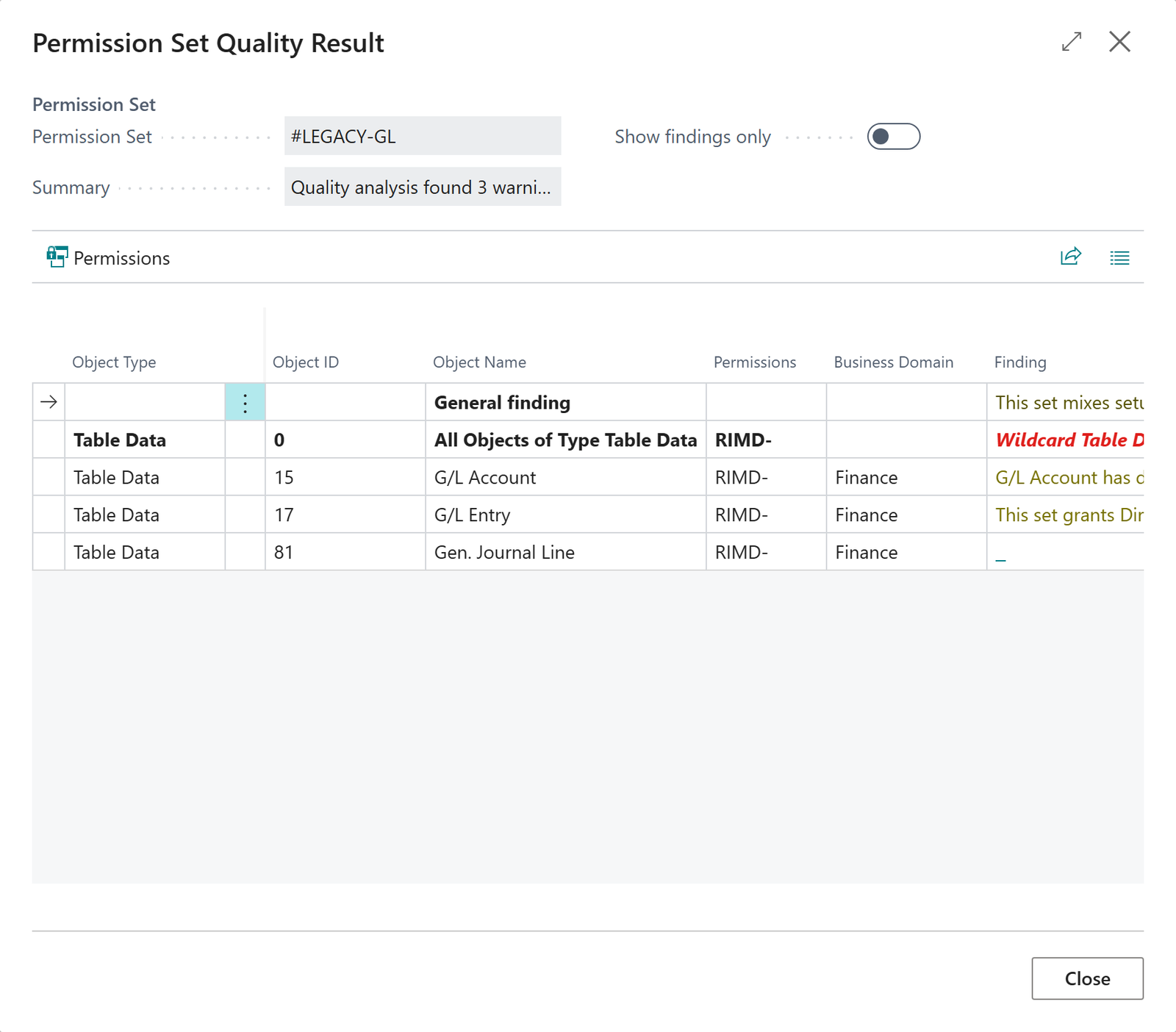
When an object has several findings, the line says how many. Select it to open a list with one row per finding: severity, rule, finding text, recommended action and a learn-more link. The severity of the line is the highest of its findings.
| Severity | Typical findings |
|---|---|
| Critical | Unrestricted access to all objects of a type with any active permission. Delete without Read. A set that includes and excludes the same related set. |
| Warning | Duplicate lines. An Include that points at a set that no longer exists. A very large set. Access to financial or sensitive data. |
| Info | Suggestions, such as splitting a large set or separating sensitive master data. |
A broad "all objects" permission is Critical. When an Exclude relation scopes it down, the finding becomes a Warning and says that the permission is scoped. Check that the excludes cover everything that should be kept out. A read-only "all objects" permission is never Critical.
¶ Check several sets at once
- Select the sets (Ctrl+click), or select none to use the current view.
- Choose Analyze Set Quality (Batch) and confirm the filter.
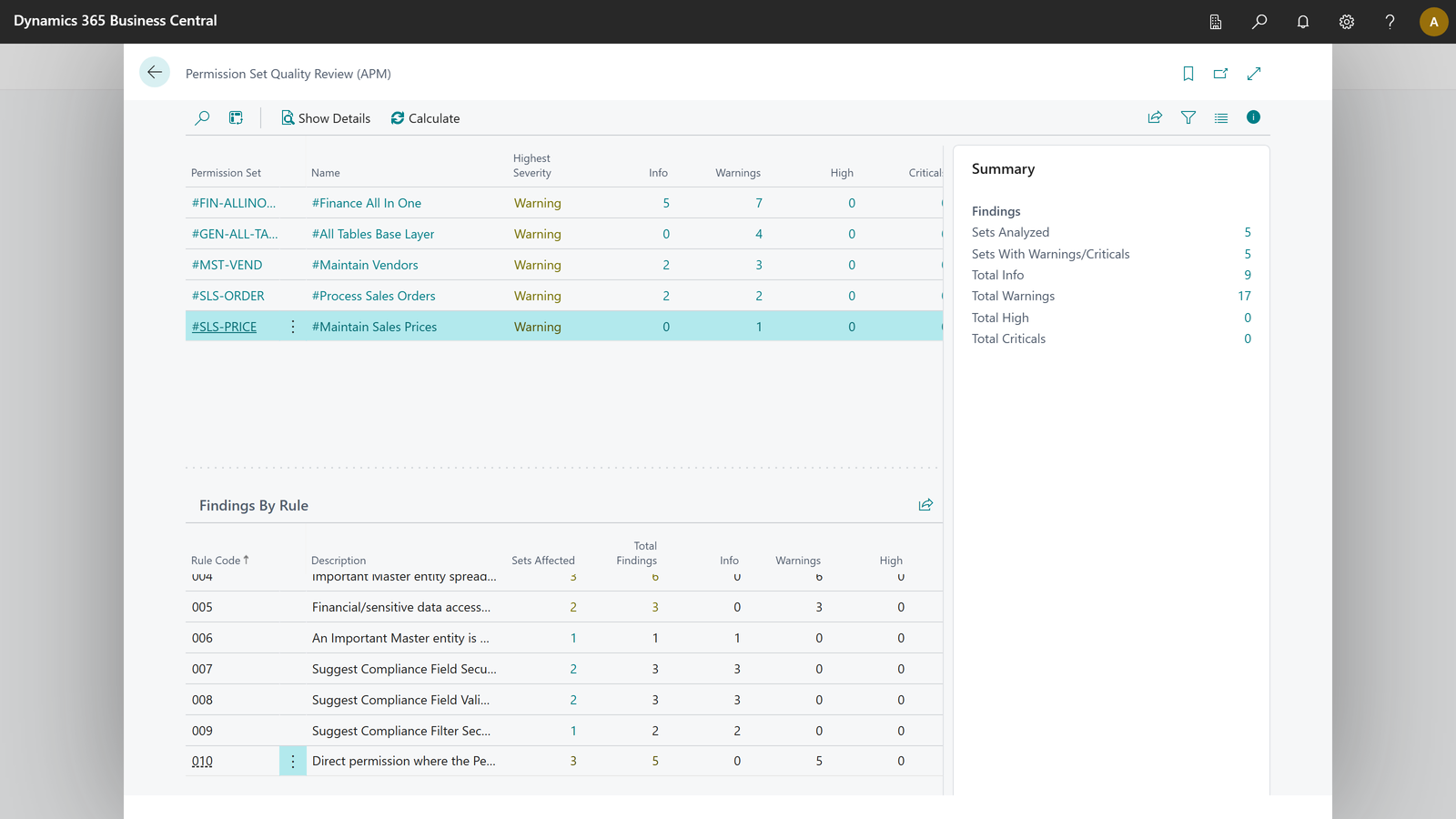
You get one line per set with its highest severity, a summary, and a Findings By Rule overview that shows per rule how many sets are affected. Choose Show Details on a set to open the same quality result with every finding per object. The critical finding is shown in red.
¶ Make it a routine
Run the batch check on your user-defined sets every quarter, and after you generate or copy sets. Fix the critical findings first. Keep the result as evidence that you look at the quality of your permission sets, and note in your next review what you decided. See also Audit and evidence.
¶ Rules in your language
The description and explanation of every rule are shown in your own language (English, German, Spanish, French or Dutch) and fall back to English. An administrator can maintain the texts per language with Translations on the Quality Rules page.
¶ Companion apps
If Field Security or Field Validation is installed, a finding can point to the table concerned in that app. If the app is not installed, the link opens its AppSource page.
Last reviewed: October 2026.