Compliance Field Validation lets data owners set requirements for the field values in any Business Central table, and decide what happens when a rule is broken: the user gets a warning, or the change is stopped. You set the rules in Business Central itself, without code.
¶ Why is it important
Bad data is cheap to fix when it is entered and expensive when it is found later: on a posted invoice, a wrong shipment or a failed audit. Standard Business Central checks only a fixed set of fields, and mostly at posting. Posting groups, payment terms, document numbers and ship-to addresses can be empty or wrong until it hurts.
Field Validation lets you say, per table and without code, what a valid record looks like, and it checks that at the moment that counts: when the user changes a field, and when the document is released. A rule can warn the user or stop the change, and the message is your own text, so users know what to fix.
Transcript of this video
Compliance Field Validation, by 2-Controlware. Set rules for the data in Business Central, without code. Three things to see. First, warning or error. A customer without a phone number is hard to reach. But how strict should your system be about it? Every validation has a type. This one says a customer must have a phone number, and the type is Warning. A user clears the phone number. Field Validation tells them at once which rule is broken. But a warning only informs. The user can carry on, and the change is saved. Now the same rule, with one change. The type is set to Error. Again the phone number is cleared, and again the rule is reported. But this time the change is reversed. The customer cannot be saved until the data is correct. Second, clean up the data you already have. A new rule protects everything users type from now on. This one says that every customer needs a country code. But what about the customers that are already in the system? Choose Check Table. Field Validation runs the rule over all existing records, and lists every customer that breaks it. Here, three. Select one, and open the related page. You land on the customer card, with the empty country code right in front of you. Enter the country code and close the card. That customer is now correct. Calculate again, and that customer is gone from the list. Two to go. Work through the list, and your old data is clean. Third, validate an order when it is released. Before an order is released, the data must be right. The external document number starts with the year and month. The posting date is today or later. Name and address are filled in. And every item line has a quantity, a price, a location, and the right description. Standard Business Central checks a fixed set of fields on release. Your own rules mean custom code, for every rule. With Field Validation, you set these rules per table, without code. This validation is for the sales header, table thirty-six. The type is Error, so a record that breaks a rule is stopped. The key setting is the condition. The rules only run when the status is not Open, so a draft stays free to edit. The starting date switches the validation on. The lines hold the rules. A regular expression checks the document number: year and month, a dash, then anything. The posting date may not be before today. Customer name and address are mandatory. The same for the lines: table thirty-seven, the sales line. Only item lines are checked. And a table relation to the header gives each line the status of its order. With that relation, the line rules also run when the order header changes. A starting date switches it on. Quantity and unit price must be above zero. The description must equal the description on the item, a related field rule across tables. And the location is mandatory. Rules load at sign-in, so we sign in again. Now we test with an order that breaks the rules. We release the order. It is stopped. The header rules and the line rules both fire, and every problem is listed with the message we wrote. The user corrects the document number, the posting date, and the address. And then the quantity and the location on the lines. Release once more, and it goes through. Warnings that guide, errors that protect, and a clean-up list for old data. On any table, per company or permission set. Compliance Field Validation, by 2-Controlware. Better data, without code. Try it for thirty days.
Product demo (5 minutes): warn or block while users work, clean up existing data with Check Table, and validate a sales order when it is released.
Want to see the difference between a warning and an error first? See the one-minute video on the Examples page.
¶ How it works
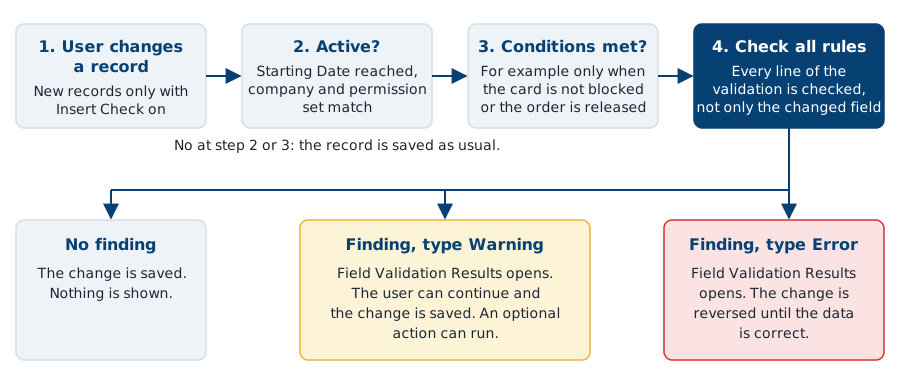
In words: when a user changes a record, Field Validation looks for an active validation for that table, company and user. If the conditions of the validation are met, it checks every rule line. When a rule is broken, the Field Validation Results page lists the finding with a message. With the type Warning, the user can continue and the change is saved. With the type Error, the change is reversed.
¶ What you can do
- Warn or block while users work. A warning informs the user. An error reverses the change until the data is correct. See Preventive.
- Find what is already wrong. Run Check Table to list the records that already break an active rule. See Detective.
- Use different kinds of rules. Check that a field is filled, filtered, has a certain length, matches a regular expression, is calculated from the user or the period, or relates to a field in another table, for example a sales line against its sales header when a document is released. See Rule types.
- Limit the scope. Make a validation valid for specific companies or permission sets, and set a starting and an ending date.
¶ What you need
- Business Central, as a SaaS (AppSource) or an on-premises installation. For the versions that are supported, see Supported Business Central versions.
- Compliance Essentials. This shared app is required for Compliance Field Validation and is installed together with it. It comes at no additional cost.
- Registration of the app after every new installation. A trial starts at registration. For the length of the trial and how to get a license, see Licenses.
- The permission set Use Field Validation (
2C FIELDVAL USE) for every user the validations apply to, and Manage Field Validation (2C FIELDVAL MANAGE) for the users who create and change validations. - Business Central version 24.0 or later for the Copilot regular expression generator.
¶ Where to go next
- Set up: install, register, load the default data, assign permissions and follow a ten-minute quick start.
- Preventive, Detective and Rule types: the core functions.
- Calculated filters and Table relations: advanced functions for values that are worked out when a rule runs, and for rules on related tables.
- Reference: every field of a validation, the Validation Value syntax and the default messages.
- Examples, ready-made validations for common cases, and the FAQ.
¶ Help, other solutions and services
Questions or a problem? See Support and contact for support@2-controlware.com and the support process. For monitoring authorizations across environments, see the Authorization Box from 2-Controlware. For implementation, audit experience and consultancy, see 2-Control.nl.
Last reviewed: October 2026.