Each recipe gives you a goal, the setup, and the result. Create the validation as described in Create a validation, set a Starting Date of today or earlier, and sign in again. Use a test company first.
| Recipe | Goal |
|---|---|
| Recipe 1 | A customer must have a phone number: introduce the rule as a warning, then enforce it |
| Recipe 2 | Block releasing a sales order without a ship-to address or external document number |
| Recipe 3 | Customers always have their posting groups |
| Recipe 4 | A sales order has the same customer posting group as its customer |
¶ Recipe 1: Mandatory field, warning first, then error
Goal: every customer has a phone number. You do not want to block users on day one, because many customers do not have one yet.
Setup
| Setting | Value |
|---|---|
| Table ID | 18 (Customer) |
| Validation Type | Warning, later Error |
| Line | Type Mandatory, field Phone No. |
| Notification | Leave the sample message "Field Phone No. is mandatory.", or write your own |
| Starting Date | Today |
Steps
- Create the validation with the type Warning and sign in again.
- Run Check Table. It lists the customers that have no phone number. Work through the list.
- When the list is empty, change the Validation Type to Error, and sign in again.
Result: with the Warning, a user who clears the phone number sees the results page with the finding, and the empty phone number stays saved. With the Error, the change is reversed after the results page, and the customer cannot be saved until a phone number is filled in.
Transcript of this video
Warning or error? With Field Validation, you decide how strict a rule is. A customer without a phone number is hard to reach. But how strict should your system be about it? Every validation has a type. This one says a customer must have a phone number, and the type is Warning. A user clears the phone number. Field Validation tells them at once which rule is broken. But a warning only informs. The user can carry on, and the change is saved. Now the same rule, with one change. The type is set to Error. Again the phone number is cleared, and again the rule is reported. But this time the change is reversed. The customer cannot be saved until the data is correct. Warnings guide, errors protect. Choose the right level for every rule. Field Validation, by 2-Controlware. Try it for thirty days.
Video (1 minute): the same rule as a warning and as an error.
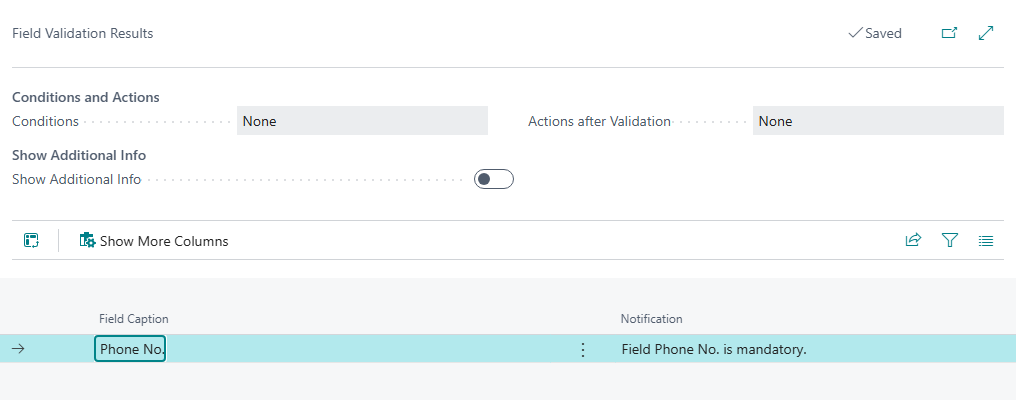
Warning: the user is informed and the change is saved
Add the customer number and name to the message with Reference Fields for Notifications, so users and you see which customer a finding is about. See Notification and reference fields.
¶ Recipe 2: Block releasing a sales order
See the full recipe: Block releasing a sales order without a ship-to address or external document number.
¶ Recipe 3: Posting groups filled
Goal: every customer has a general business posting group and a customer posting group, so a missing group is found when the card is made and not when someone tries to post.
Setup
| Setting | Value |
|---|---|
| Table ID | 18 (Customer) |
| Validation Type | Warning first, then Error |
| Line 1 | Type Mandatory, field Gen. Bus. Posting Group |
| Line 2 | Type Mandatory, field Customer Posting Group |
Steps
- Create the validation with both lines and the type Warning.
- Run Check Table to find the existing customers with a missing group, correct them with Open related page, and calculate again.
- Switch to Error when the list is empty.
Result: a customer card without a posting group is reported with a message per missing field, for example "Field Customer Posting Group is mandatory." Because all lines of a validation are checked on every modification, a user who changes any field of such a customer sees all missing groups at once.
The same pattern works for vendors (table 23) and items (table 27) with their posting groups. Use the field captions of your own language and version.
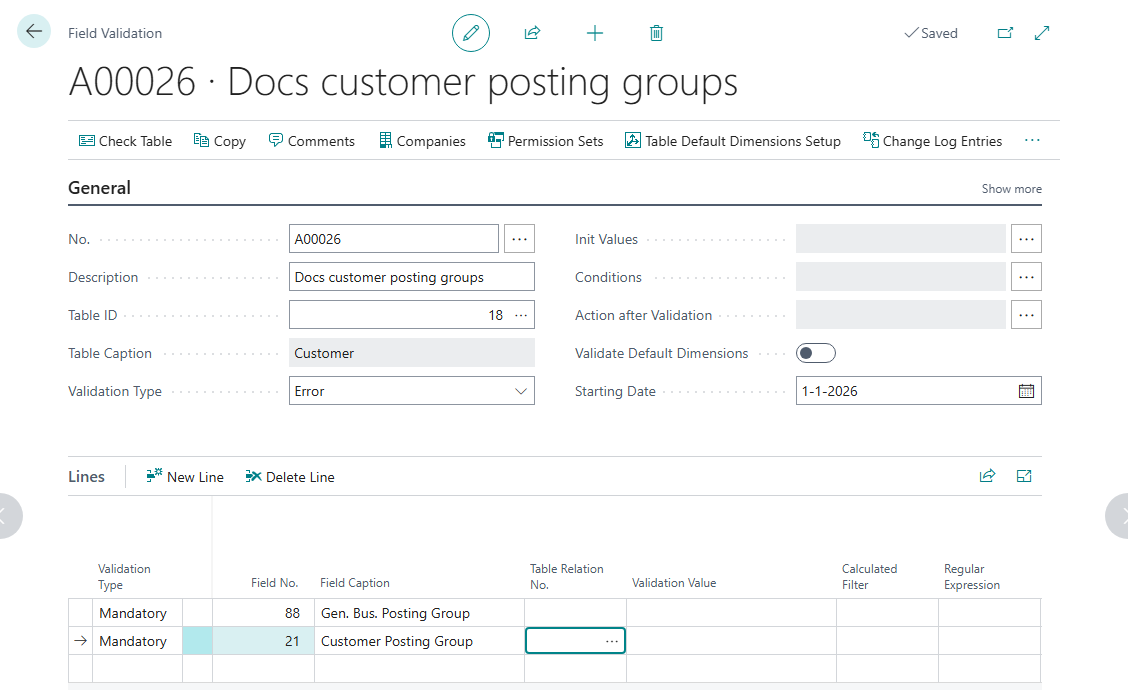
The validation with its two Mandatory lines.
¶ Recipe 4: Related field check
Goal: the customer posting group on a sales order must be the same as the customer posting group on the customer card. When someone changes the posting group on the order, or the order has an old value, the user is told.
Setup
| Setting | Value |
|---|---|
| Table ID | 36 (Sales Header) |
| Validation Type | Warning |
| Line | Type Related Field, field Customer Posting Group |
| Table Relation No. | T36 - T18 (sales header to customer), part of the default data |
| Table Relation Validation Type | Equal |
| Related Field No. | Customer Posting Group (of the customer) |
The relation T36 - T18 links the field Sell-to Customer No. of the sales header to the No. of the customer. You do not fill in a Validation Value for this type.
Steps
- Load the default data on the Field Validation Setup page, so the relation exists. See Install and set up Field Validation.
- Create the validation and the line as in the table. Choose the relation with the AssistEdit button in Table Relation No.
- Start with the type Warning and sign in again.
- Open a sales order, and change the Customer Posting Group to another group.
Result: the results page opens with the message "Field Customer Posting Group must be Equal Customer Posting Group in table Customer." The user can continue with a warning. Use the type Error when the order must never differ from the customer.
When a validation uses a table relation, Business Central may ask for a confirmation ("Your change might update related records"). Choose Yes. If you want the rule to run when the customer changes as well, see Table relations.
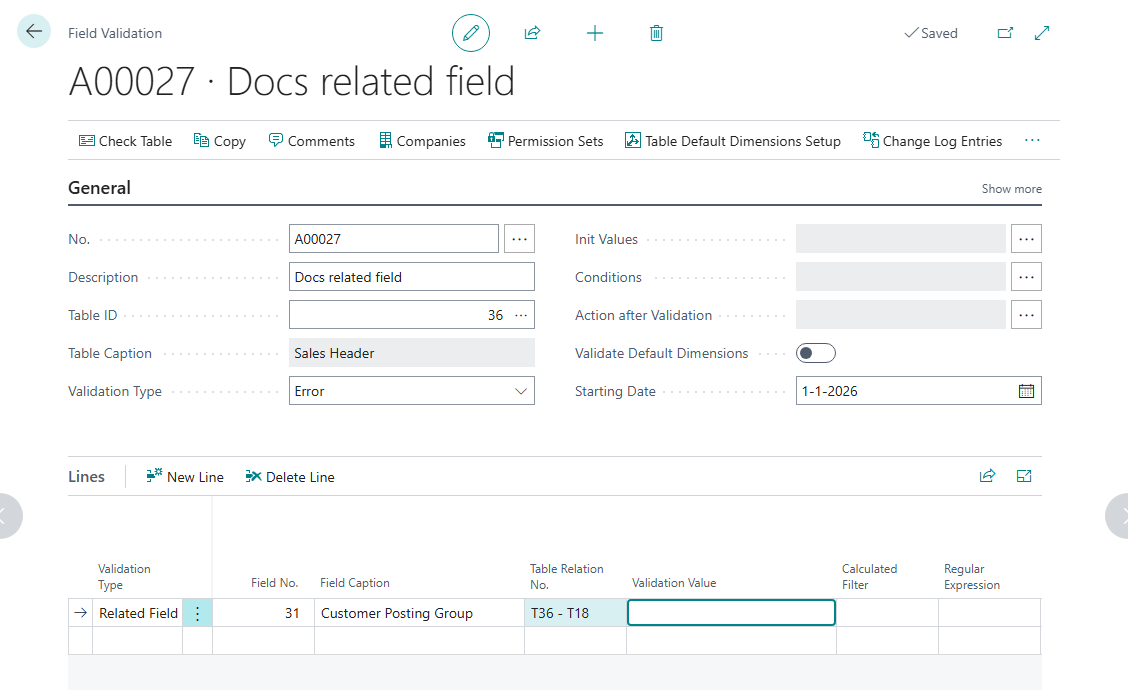
The line of type Related Field with the table relation from the sales header to the customer.
¶ More ideas
- A text field with a pattern, such as a postal code or IBAN: see the regular expression cookbook.
- A date that must be in the current period: see Calculated validations.
- Existing data that must be cleaned: Check Table.
¶ Recipe: block releasing a sales order
Goal: a sales order can only be released when the data is complete: the external document number is filled in and follows your format, and the ship-to name and address are filled in. The user sees every missing item in one list, with the message you wrote.
Transcript of this video
Validate sales orders at the moment they are released. Header and lines, without code. Before an order is released, the data must be right. The external document number starts with the year and month. The posting date is today or later. Name and address are filled in. And every item line has a quantity, a price, a location, and the right description. Standard Business Central checks a fixed set of fields on release. Your own rules mean custom code, for every rule. With Field Validation, you set these rules per table, without code. This validation is for the sales header, table thirty-six. The type is Error, so a record that breaks a rule is stopped. The key setting is the condition. The rules only run when the status is not Open, so a draft stays free to edit. The starting date switches the validation on. The lines hold the rules. A regular expression checks the document number: year and month, a dash, then anything. The posting date may not be before today. Customer name and address are mandatory. The same for the lines: table thirty-seven, the sales line. Only item lines are checked. And a table relation to the header gives each line the status of its order. With that relation, the line rules also run when the order header changes. A starting date switches it on. Quantity and unit price must be above zero. The description must equal the description on the item, a related field rule across tables. And the location is mandatory. Rules load at sign-in, so we sign in again. Now we test with an order that breaks the rules. We release the order. It is stopped. The header rules and the line rules both fire, and every problem is listed with the message we wrote. The user corrects the document number, the posting date, and the address. And then the quantity and the location on the lines. Release once more, and it goes through. The same works on any table, as a warning or an error, per company or permission set. Field Validation, by 2-Controlware. Better data, without code.
Video (3 minutes): validation rules on the sales header and the sales lines, set up with the validation type Error. A sales order that breaks the rules cannot be released. All findings are listed with the messages you wrote, and after the corrections the order is released.
¶ What you need
- Field Validation is set up, and the default data is loaded. See Install and set up Field Validation.
- The regular expression
YEAR MONTH PREFIXfrom the regular expression cookbook, if you want to check the format of the external document number. - A test company with a sales order that you can release.
¶ Setup of the header validation
| Setting | Value |
|---|---|
| Table ID | 36 (Sales Header) |
| Validation Type | Error |
| Conditions | Field Status, filter <>Open |
| Starting Date | Today |
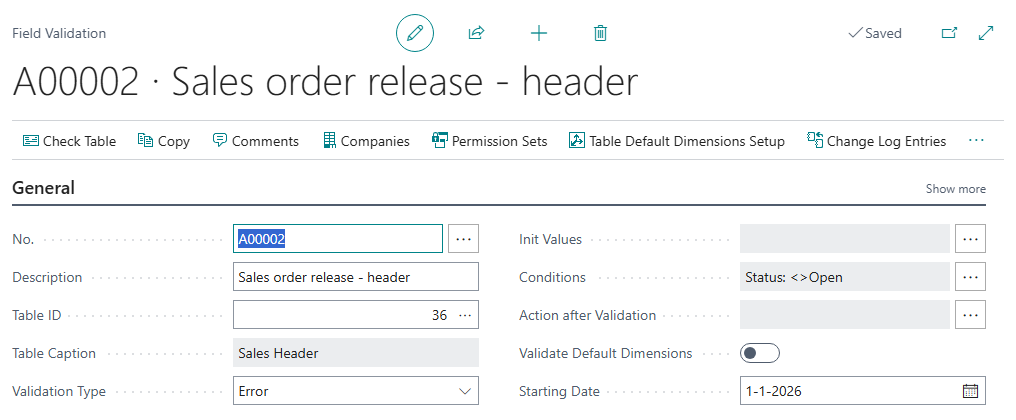
The condition is the key setting. The rules only run when the status is not Open, so a draft order stays free to edit. When a user releases the order, the status changes and the rules are checked.
¶ Rule lines
| Type | Field | Value | Message (Notification) |
|---|---|---|---|
| Mandatory | External Document No. | The external document number is required to release the order. | |
| Regular Expression | External Document No. | YEAR MONTH PREFIX |
The external document number must start with the year and month, a dash, and then text. |
| Mandatory | Ship-to Name | The ship-to name is required. | |
| Mandatory | Ship-to Address | The ship-to address is required. |
Write your own message in the Notification field of each line, so the user knows what to do. Business Central fills in a sample message first. See Notification and reference fields.
The Mandatory rule and the expression give two separate messages: one for an empty field and one for a wrong format. The expression alone would also refuse an empty value, but then with the format message only.
¶ Test it
- Sign out and sign in again, so the validation is loaded.
- Open a sales order that has no external document number, and choose Release.
- The release is stopped. The Field Validation Results page lists each broken rule with your message.
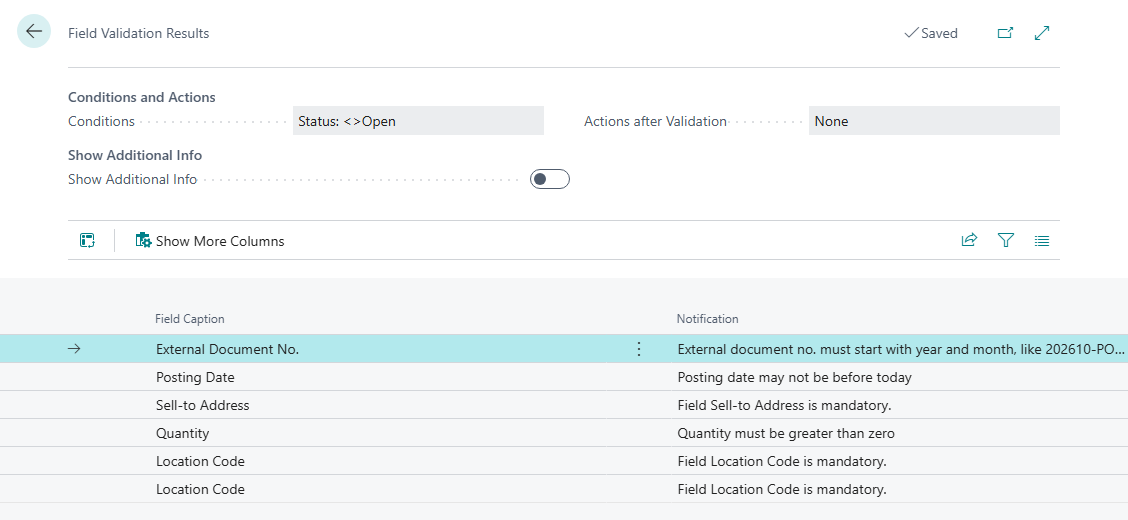
Release is stopped and every broken rule is listed with your own message.
4. Close the page. The order stays open, because with the type Error the modification is reversed.
5. Fill in the external document number, for example 202610-ORDER1, and the ship-to data, and release again. The order is released.
¶ Variations
- Check the posting date. Add a Calculated rule on Posting Date with a calculated filter of the type Date Formula and the expression
t.., which allows today or later. Create the filter on the Calculated Filters page. - Check the lines too. Add a second validation on the table Sales Line with a table relation to the header, and turn on Execute validation on Related Table modifications. Without this setting the line rules do not run on release. See Table relations.
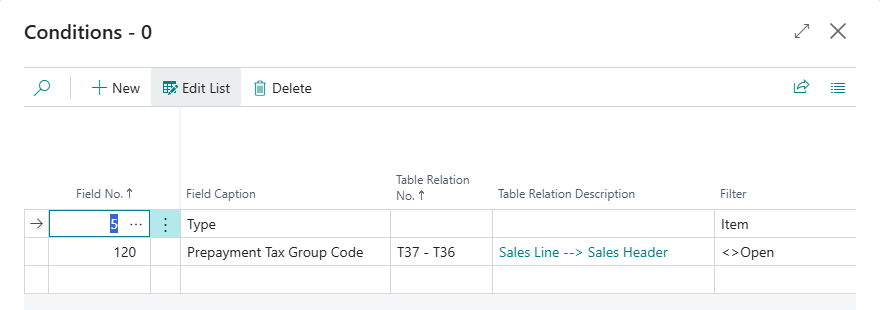
The conditions of the line validation: only item lines, and only when the status of the related sales header is not Open.
- Introduce it softly. Start with the type Warning and the action that sets the status back to Open, as in Variant B of the table relations example.
Standard Business Central checks only a fixed set of fields when you release a document. These rules add your own checks without code.
Last reviewed: October 2026.