This page takes you from installation to a working setup: install the app, register it, load the default data, set the number series, and give users the permissions they need. Compliance Field Validation needs Compliance Essentials, which is installed with it at no extra cost. For the supported Business Central versions, see Supported Business Central versions.
¶ Install the app
¶ Business Central online (AppSource)
- In Business Central, search for Extension Marketplace, or open Microsoft AppSource.
- Search for Compliance Field Validation and install it.

After the installation, a green notification bar tells you that the setup must be finished. The link opens the setup wizard.
¶ Business Central on-premises
Publish and install the extension as described by Microsoft: Publish and install an extension. Partners can download the apps from the 2-Controlware partner portal. Install Compliance Essentials first, then Compliance Field Validation.
Your license must contain these granules:
| App | Granule |
|---|---|
| Compliance Essentials | 70077720 |
| Compliance Field Validation | 70196830 |
If you are a partner and you are not authorized as reseller for these granules, contact sales@2-controlware.com.
¶ Choose your path
| Path A: wizard (recommended) | Path B: manual | |
|---|---|---|
| Best for | A first installation | When you want to do each step yourself, or the wizard was closed |
| You start with | Field Validation Setup Wizard | Field Validation Setup |
| What you do | Follow the steps | Register, load default data, set number series, assign permissions |
| Result | Setup done and a first validation created | Setup done, no validation yet |
Do not mix the two halfway. If you start the wizard, finish it. If you started by hand, you can still use the wizard later for new validations.
¶ Path A: the setup wizard
- Search for Field Validation Setup Wizard and open it, or follow the link in the green notification bar.
- Load Default Data (optional here): loads the standard table relations, regular expressions and calculated filters. You can also do this later.
- Field Validation Nos.: select or create the number series for validations.
- Field Validation User: select the user who gets
2C FIELDVAL MANAGE. All other users automatically get2C FIELDVAL USE. - Register: fill in the registration form. Do not skip this step, because the app cannot be used without registration.
- Table ID: choose the table for your first validation and add rule lines. See Quick start in 10 minutes.
- Choose Finish.
Closing the wizard while a first validation is unfinished deletes that validation after a confirmation. Registration and the other steps are kept.
If Business Central asks whether the extension may make a request to an external service, choose Allow Always. Registration, license information and the default data all need this connection.
¶ Path B: set up by hand
¶ Register the app
You must register Field Validation after every new installation, for each app and each database separately. When a registration or license request is needed, Business Central shows a message when you sign in or open the overview page.
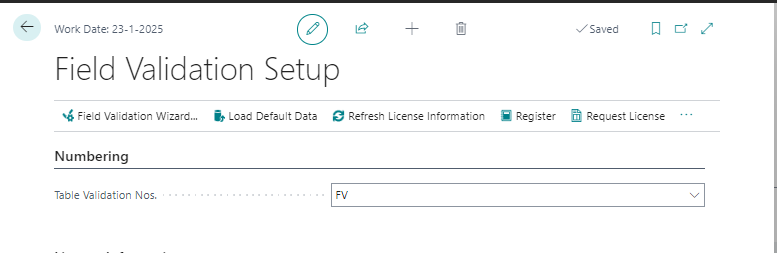
- Search for Field Validation Setup. (This is the setup page, not the wizard.)
- Choose Register and fill in the fields.
- Choose Save.
¶ Load the default data
- On the Field Validation Setup page, choose Load Default Data.
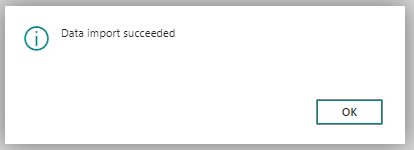
The default package contains the standard table relations, regular expressions and calculated filters. A message tells you when the import succeeded.
The Load Demo Data action on the same page imports sample validations. Use it in a test environment to see examples.
¶ Set the number series
Every validation gets a number from a number series.
- On the Field Validation Setup page, open the Numbering FastTab.
- In the Table Validation Nos. field, choose New.
- Enter the letters the validation numbers start with and the number range.
- Enter a Starting Date. Select Increment-by No. if you need it, and Gaps are allowed if gaps in the numbers may occur.
- Choose OK.
New validations now use this number series. The No. field of a validation is filled in automatically when you choose the table.
¶ Assign the permission sets
Field Validation has two permission sets:
| Permission set | Use |
|---|---|
Use Field Validation (2C FIELDVAL USE) |
Required for every user the validations apply to. Without it, a validation does not run for that user and the extension gives an error. |
Manage Field Validation (2C FIELDVAL MANAGE) |
For the users who create, change and delete validations. |
Assign 2C FIELDVAL USE manually to every newly created user.
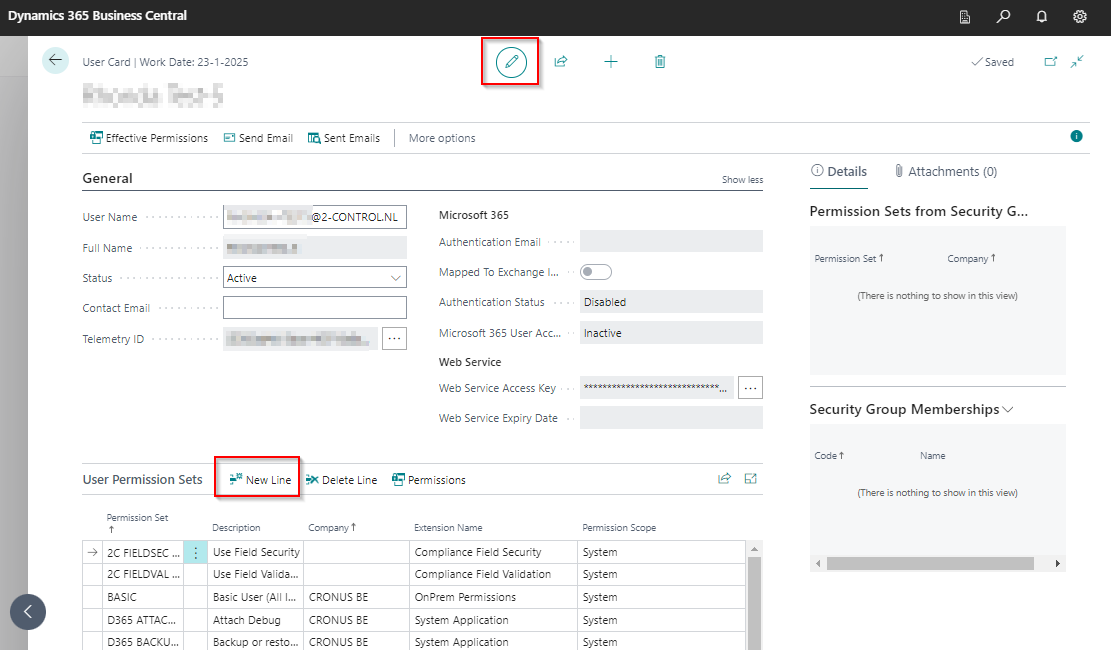
- Search for Users.
- Select the user and choose Edit.
- Choose New Line to add a permission set.
To remove a permission set, select the line and choose Delete Line.
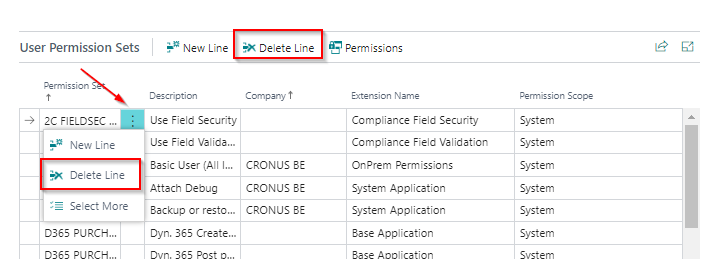
You need an account with SUPER permissions to assign and remove permission sets.
During installation from release 5.2.202410NN.0 onward, Business Central asks whether the USE permission must be assigned to every user.
¶ Trial and license
The end date of the trial is shown under License Information on the Field Validation Setup page, with the registration date and, later, the contract dates. Choose Refresh License Information to see the current status. For the length of the trial, how to request a license and what to do when the status does not change, see Licenses and the Field Validation FAQ.
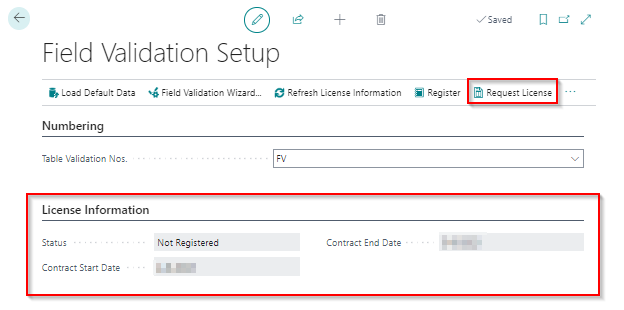
¶ The Field Validation Setup page
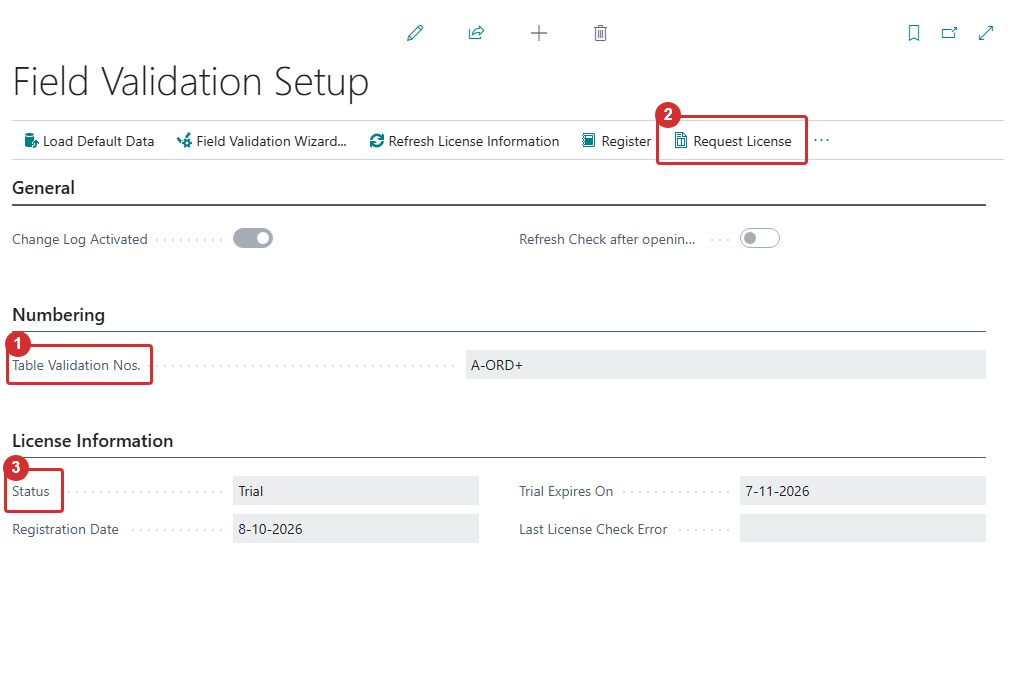
| Field or action | What it does |
|---|---|
| Change Log Activated | On by default. Changes to Field Validation data (validations, lines, conditions) are always written to the change log, so you can see who changed a rule. See Change Log Entries in the validations list. |
| Refresh Check after opening related page | When on, the Check Table overview recalculates by itself when you come back from the related page of a record, so a corrected record disappears from the list without choosing Calculate. |
| Table Validation Nos. | The number series for new validations. |
| Reference Fields for Notifications | Opens the list of fields that are added to the finding messages. See Notification and reference fields. |
| Load Default Data | Loads table relations, regular expressions and calculated filters. |
| Load Demo Data | Loads sample validations for a test environment. |
| Field Validation Wizard | Starts the wizard to create a validation. |
| Refresh License Information, Register, Request License | Registration and license. |
¶ First steps
- Create your first validation. See Create a validation, or follow the quick start.
- Set a Starting Date of today or earlier, so the validation is active.
- Sign out of Business Central and sign in again, also for the users the validation applies to. Validations are loaded when a user signs in.
¶ Field Validation quick start in 10 minutes
In this quick start you make the Phone No. of a customer mandatory, and you see what a user sees when the field is empty. It takes about ten minutes and uses the setup wizard, which does the first-time setup and creates the validation in one go. You can use a test company or a sandbox.
You need Compliance Field Validation installed (see Install and set up Field Validation) and an account with the permission set 2C FIELDVAL MANAGE or SUPER permissions.
¶ Step 1: Run the setup wizard
- Search for Field Validation Setup Wizard and open it. After a fresh installation, Business Central also offers it in a notification bar.
- On the welcome page, choose Load Default Data, and then Next. This loads the standard table relations, regular expressions and calculated filters.
- In Field Validation Nos., select a number series (or create one with the drill-down), and choose Next.
- Select the user who gets the permission set Manage Field Validation (
2C FIELDVAL MANAGE), and choose Next. All other users get Use Field Validation (2C FIELDVAL USE). - Register the app: fill in the registration form and choose Next. The trial starts at registration. If Business Central asks whether the extension may make a request to an external service, choose Allow Always.
¶ Step 2: Create the validation
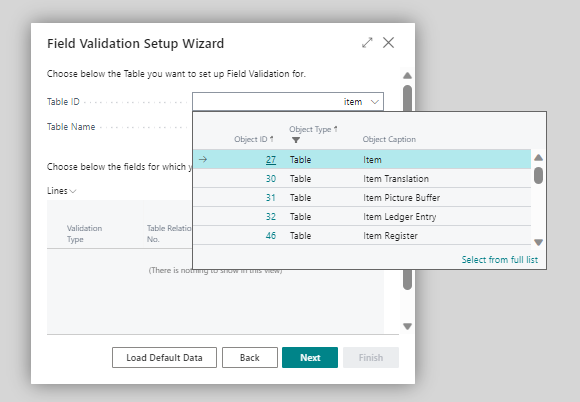
- In Table ID, choose table
18(Customer). - In the lines, set the rule Type to Mandatory and the field to Phone No.
- Choose Next and then Finish.
The wizard creates a validation with today as the starting date. Closing the wizard before you reach the end deletes the unfinished validation, so finish it first.
¶ Step 3: Choose Warning and activate
- Search for Field Validations and open the new validation.
- Check the Validation Type. Set it to Warning for this exercise. A new validation starts as Error.
- Check that the Starting Date is today or earlier.
- Sign out of Business Central completely and sign in again. Validations are loaded at sign-in.
¶ Step 4: See the result
- Open a customer card.
- Clear the Phone No. field and move to another field.
- The Field Validation Results page opens. It shows the finding for the field Phone No. with the message "Field Phone No. is mandatory."
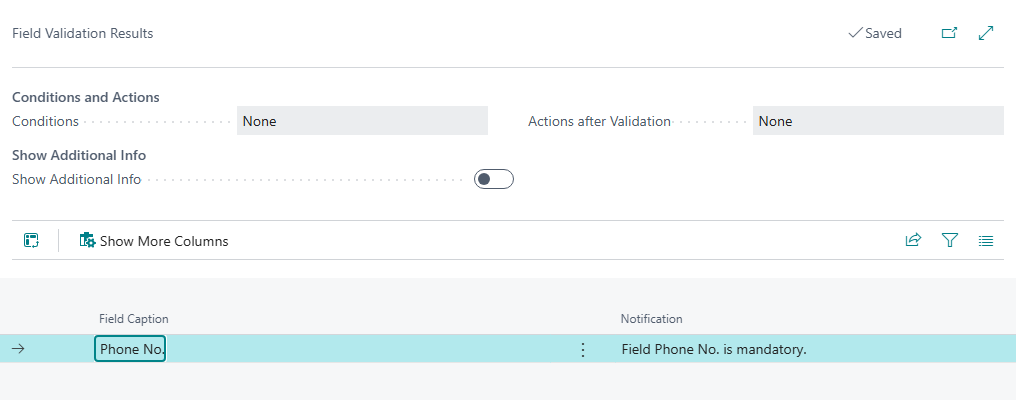
The results page for a validation of the type Warning
Close the results page. With the type Warning, the card shows Saved and the empty phone number stays saved. The user was told, but not stopped.
¶ Step 5: Try the type Error
- Open the validation again and change Validation Type to Error.
- Sign out and sign in again.
- Clear the Phone No. again.
The same results page opens. After you close it, the card shows Not saved and a red bar that says your modifications are reversed. The user cannot save the customer until the phone number is filled in.
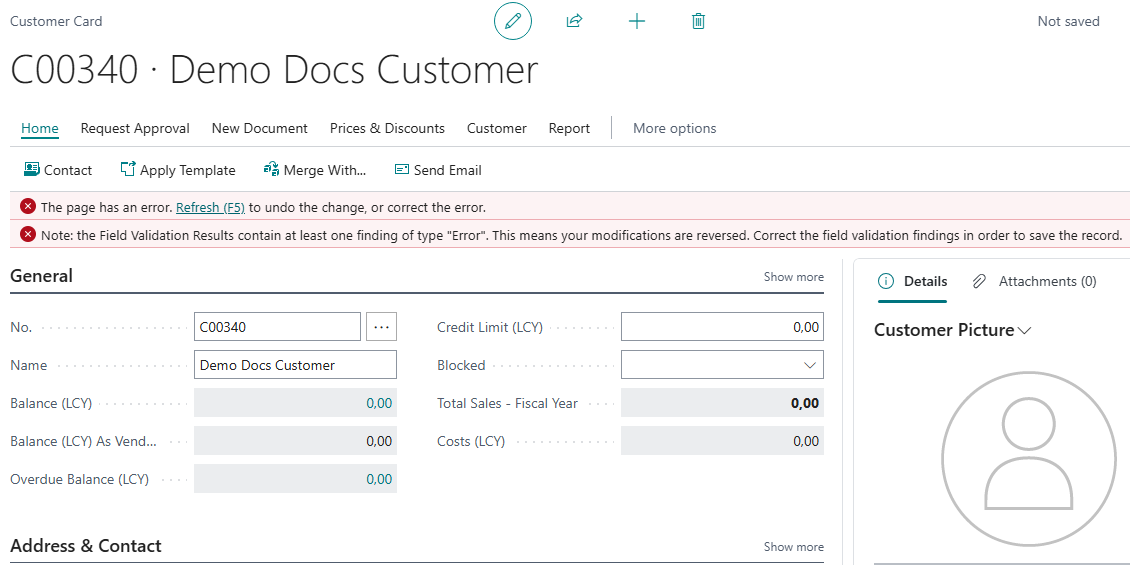
The same rule with the type Error
¶ Clean up and next steps
If you used a test company, delete the validation, or set an Ending Date.
- Make a rule fit your case with Which rule type do I need?.
- Copy a ready-made solution from the recipes.
- Find out why a validation does not fire: Field Validation FAQ.
Last reviewed: October 2026.