Start with the table: find your symptom, see the likely cause and fix, and follow the link for details. The licensing answers that apply to all apps are on this page. For a problem with one app, use Problem with a specific app?.
¶ Find your symptom
| Symptom | Likely cause | Fix | Details |
|---|---|---|---|
| A Field Security does nothing. No warning, no error. | No starting date, user not signed in again, or permission sets not linked. | Set a starting date on or before today. Sign out completely and sign in. Link all permission sets. | Field Security FAQ |
| A validation shows no message. | Starting date, conditions, or the user did not sign in again. | Check the dates and conditions. Sign out and sign in. | Field Validation FAQ |
| Line rules do not run when I release a document. | The relation to the header is not set up to run on changes. | Follow the steps in the FAQ. | Field Validation FAQ |
| A user cannot use the app. | The user does not have the USE permission set. | Assign the permission set of the app. | Users cannot use the extension |
| The number of linked permission sets is wrong. | The number is not recalculated by every action. | Calculate the numbers on the setup page. | Field Security FAQ |
| The app asks me to register, or the setup wizard shows. | The app is not registered in this environment. | Open the setup page of the app. Choose Register. | Register a new environment |
| The trial has ended. | The 30-day trial is over. | Request a license from the setup page. | Turn a trial into a license |
| I have a license, but the app still shows Trial. | The registration is not yet matched to your contract. | Wait up to 48 hours. Refresh the license information. | Registration and matching |
| I installed the app in a new environment and the license is gone. | Each environment is registered on its own. | Register the app again in that environment. | Register a new environment |
| The license check shows an error or a reminder. | The app cannot reach the registration service. | Allow HTTP requests for Compliance Essentials. | License check shows an error |
| I cannot find the app in Extension Management. | The app is not installed. | Online: install it from Marketplace. On-premises: publish and install it. | Getting started |
| On-premises: the install fails. | Compliance Essentials is missing, the build does not fit your Business Central version, or a granule is missing. | Install Compliance Essentials first. Check the version and the granules. | Information for partners |
| I cannot find a build for my Business Central version. | The version is outside the supported range. | Look up your version in the table. | Supported versions |
| Advanced Permissions Management says a feature is not available in the trial. | The feature needs a license. | Request a license on the setup page. | Advanced Permissions Management FAQ |
¶ Licenses
¶ How can I turn my trial into a license?
Do this from the setup page of the app: Field Security Setup, Field Validation Setup, Inventory Reconciliation Setup or Advanced Permissions Management Setup. Advanced Permissions Recorder is free. Its setup page has Register and Refresh License Information, but no Request License.
- Open the setup page of the app in Business Central.
- At the top of the page, choose Request License.
- Complete the registration details if some are missing.
- Choose Confirm and request license.
You receive an email after you complete the registration. The license is then matched to your account.
¶ How do I retrieve my license when the extension is installed in a new environment?
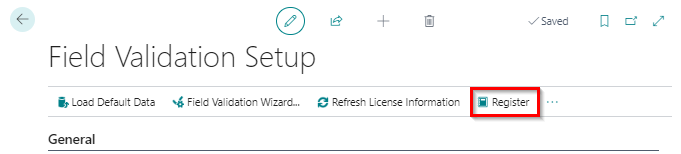
You must register an extension again in each new environment.
- Open the setup page of the extension.
- In the top bar, choose Register.
- Fill in your details and send them.
You see a message that the registration succeeded. 2-Controlware matches the registration with a valid license. See How long does registration take?.
¶ The app is on my license, but I still cannot use it
You must register an app before you can use it. Register each app, and each database, separately.
After you register, 2-Controlware checks whether a valid contract applies. In the meantime, a 30-day trial runs. If the license is still not active after 48 hours, email support@2-controlware.com. Include the app name and the environment (database) where you registered.
¶ How long does registration take?
After you register, 2-Controlware receives a notification. We check whether a valid contract applies. If it does, the license is usually active within 24 to 48 hours. Choose Refresh License Information on the setup page to see the new status. The status changes from Trial to Contract.
¶ The license check shows an error or a reminder
The apps check the license over the internet. If the check fails, Business Central shows an error or a reminder.
- In Extension Management, the setting Allow HttpClient Requests must be on for Compliance Essentials. It is the only app that needs it.
- In a cloud sandbox, Allow Http Clients must be on at app level. Without it, Refresh License Information shows a reminder.
- Outgoing HTTP calls must not be blocked on your network or server.
¶ Users
¶ Users cannot use the extension
Users probably do not have the USE permission set of the app. Assign it to those users. The names of the permission sets are in Getting started. From release 5.2.202410NN.0, the installation wizard asks whether to assign the USE permission set to every user. Assigning permission sets needs an account with SUPER permissions.
¶ Versions and availability
Which Business Central versions get the latest release? See Release notes. That page is the one place for the support policy.
¶ Problem with a specific app?
| App | Where to look |
|---|---|
| Field Security (including Filter Security and Action Security) | Field Security FAQ |
| Field Validation | Field Validation FAQ |
| Advanced Permissions Management | Advanced Permissions Management FAQ |
| Advanced Permissions Recorder | Advanced Permissions Recorder FAQ |
| Inventory Reconciliation | Inventory Reconciliation FAQ |
| Compliance Essentials | Compliance Essentials FAQ |
Still stuck? Email support@2-controlware.com. Include the app, the version number (see Read a version number), and a description or screenshot of the message. Support runs through your Dynamics partner first, then through a ticket; see Software support. Tickets are answered within 24 hours. Remote support uses AnyDesk. For help with implementation or an audit, see 2-Control.nl.
Last reviewed: October 2026.