Answers to common questions about Compliance Field Security. Start with the troubleshooting table. For terms see the Glossary. For questions about other apps see Troubleshooting.
¶ Troubleshooting table
| What you see | Likely cause | What to do |
|---|---|---|
| The rule exists, but the change is saved or the record is not hidden | The user did not sign out and in again. Or the starting date is empty or in the future. Or the permission set is not linked. Or the user also has a permission set with write access that is not linked (a data owner). Or the user has no 2C FIELDSEC USE. |
Check these in order: My rule does nothing. Use Effective security. |
| "You do not have permission to modify field Job Title in table Employee because of Field Security FS-JOB-TITLE. Your message." | The rule works. The user tried to change a locked field. | Nothing to fix. To allow the user, remove the link or give a permission set that is not linked (data owner). Make your message say who to ask. |
| "You do not have permission to insert into table ..." or "... to delete from table ... because of Filter Security ..." | A Filter Security of the type Editable stops this user from creating or deleting a record outside the allowed part. | Check the filter of the line. See Hide records. |
| "You do not have permission to execute action Release because of the action security on page ...." | An Action Security is linked to a permission set of this user. | Expected. To allow the action, remove the link. See Block actions. |
| After you created a rule, the user cannot change any field of the table | Default Editable is off, so the whole table is locked except the lines. | Turn Default Editable on to lock only the lines. See Lock one field or lock the whole table. |
| "You can not use the Error Message if Default Editable is set to No. Use the Error Message in the header." | You filled in the Error Message on a line, but Default Editable is off. | Use the message in the header, or turn Default Editable on. |
| "The Filter value ... includes a non allowed operator <, >, . or &." | The Filter Value in the header of a Field Security does not accept these characters. | Use plain values, *, ? and \|. See Filter syntax. |
| Initial entry does not work | Default Editable is off, or Initial Field Entry Allowed is not checked on the permission set, or the field already has a value. | See Allow initial field entry. |
| The lines of a rule disappeared | You changed the Table ID. This deletes the lines. | Create the lines again. Use Copy to keep a template. |
| The list of Action Securities is empty | The default data is not loaded. | On Field Security Setup choose Load Default Data. |
| A sales or purchase document cannot leave "Pending Approval" | Your rule checks the status change. | Turn on Skip on Indirect Approval Actions. See Reference. |
| Rules stopped working, or "Your trial or license of the extension ... has expired", or "You do not have a license to use the extension ... Please register to start a trial" | The trial or license ended or the app is not registered. Without it the app loads no rules. | Register or request a license. See Troubleshooting. |
| You cannot create another rule | Without a valid trial or license you can set up no more than three of each kind. | Register or request a license. |
| Last License Check Error shows "Error on HTTP request ..." | The app could not reach the registration service. It then allows full access for one day. | Check that the environment may call the internet (firewall, and in a sandbox the setting Allow HttpClient Requests for Compliance Essentials). Choose Refresh License Information. |
| "Your trial or license has expired. Please go to Field Security Setup and click on Request License" when you open the wizard | The registration is older than the trial or license. | Choose Request License on Field Security Setup. |
¶ My rule does nothing
Check these points in order:
- Starting date. The rule needs a starting date on or before today. An empty date means not active.
- Sign in again. After you set the starting date, sign out of Business Central completely and sign in again. If you do not, the rule is not active yet.
- Permission sets. Check that the correct permission sets are linked to the lines. If a user has several permission sets that allow changes to the table, and some are not linked, the not linked sets override the rule. Check that all permission sets with modify permissions on the table are in the list of linked permission sets. Example: you set Default Editable to off, but the user has a permission set that is not in any of the exception lines. Then the rule does not apply to that user, and the user can still edit the table.
- USE permission. The user needs the permission set
2C FIELDSEC USE. - License. The status on Field Security Setup must be Trial or Contract.
- Where you test. Test with a user who is not SUPER, unless you linked SUPER on purpose.
See also When the rule does not apply.
¶ Users cannot use the app
They probably do not have the permission set 2C FIELDSEC USE. See Assign permission sets. The wizard assigns it to the users that exist at that moment. Users you create later need it assigned by you.
¶ The number of linked permission sets is not correct
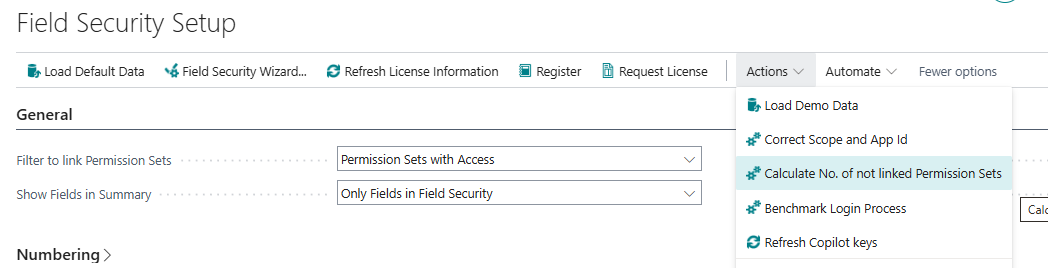
When a permission set is changed or deleted, the number in the linked or not linked column should go down. The actions Effective Securities and Not secured Users/Permission Sets do not recalculate it. To get the correct numbers, open Field Security Setup and choose Calculate No. of not linked Permission Sets. On the Field Securities and Filter Securities lists the action is called Calculate not linked Permission Sets.
¶ Can I change the permission sets on all lines at once?
Yes. See Change many lines at once.
¶ How can I see which permission sets are linked to a line?
Choose the information icon in the top right corner of the Field Security or Filter Security to expand the FactBox pane. See Link permission sets.
¶ Why can I not secure a system table?
Most system tables are not available to Field Security and Filter Security. Microsoft shields these tables from programming to prevent errors when users sign in.
¶ Does Field Security work for API pages, web services and imports?
Not everything is verified yet. See Limits.
¶ Licenses: trial, license, new environment
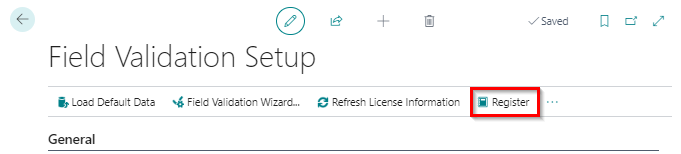
The answers live in one place: Troubleshooting. In short: on Field Security Setup you choose Register or Request License. Register again in every new environment. After registration 2-Controlware matches your contract with the registration.
¶ Which Business Central versions get updates?
See the release notes.
¶ Where can I get help?
Send an e-mail to support@2-controlware.com. Give the page URL, the message and the rule number.
Last reviewed: October 2026.