Action Security blocks actions on pages, such as Release on a sales order, for chosen users. Standard Business Central cannot do this. The app comes with a list of Action Securities for standard pages, so you only link permission sets to the actions you want to block.
Transcript of this video
Compliance Field Security. Action security. Some actions are too important for everyone. Business Central cannot switch off a single button. Action security can. Take the release action on the sales order. Today every user may press it. Open the permission sets linked to this action. Add the permission set of the users who may not release orders. Pick the set from the list, and confirm. Nothing else is needed. From now on the action is blocked for everyone with this permission set. After the next sign-in, a user opens an order that is still open. The user presses release. Business Central stops the action and tells the user why. The order stays open. Sensitive actions, in your hands. Compliance Field Security, by 2-Controlware. Try it for thirty days.
Video (about 1 minute): link a permission set to the Release action, sign in again and see the blocked release.
¶ Block an action for users
A user who has a permission set linked to an Action Security can not run that action. This is the opposite of Field Security with Default Editable off, where a link gives permission.
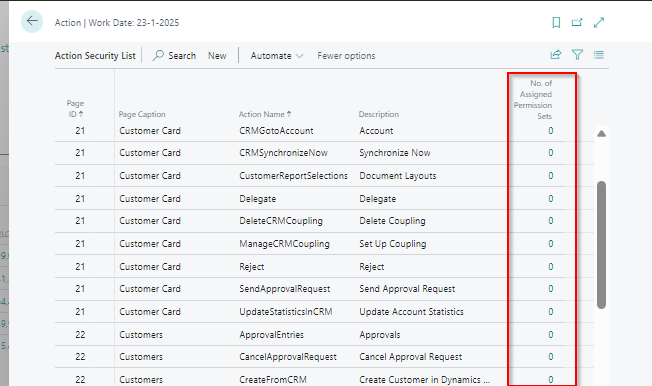
- Search for Action Securities. The list of Action Securities opens.
- Select the action you want to block.
- Choose the number in the column No. of linked Permission Sets.
- Choose New.
- Use AssistEdit to select one or more permission sets.
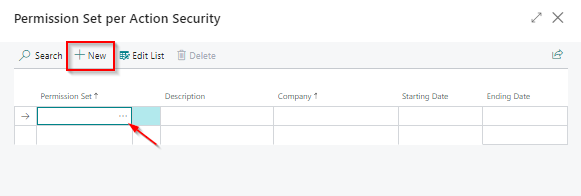
- Choose Close to return to the list.
- Ask the affected users to sign out of Business Central and sign in again.
Result. Users with the linked permission sets can no longer run the action. When they try, they see this message:
You do not have permission to execute action Release because of the action security on page 42.
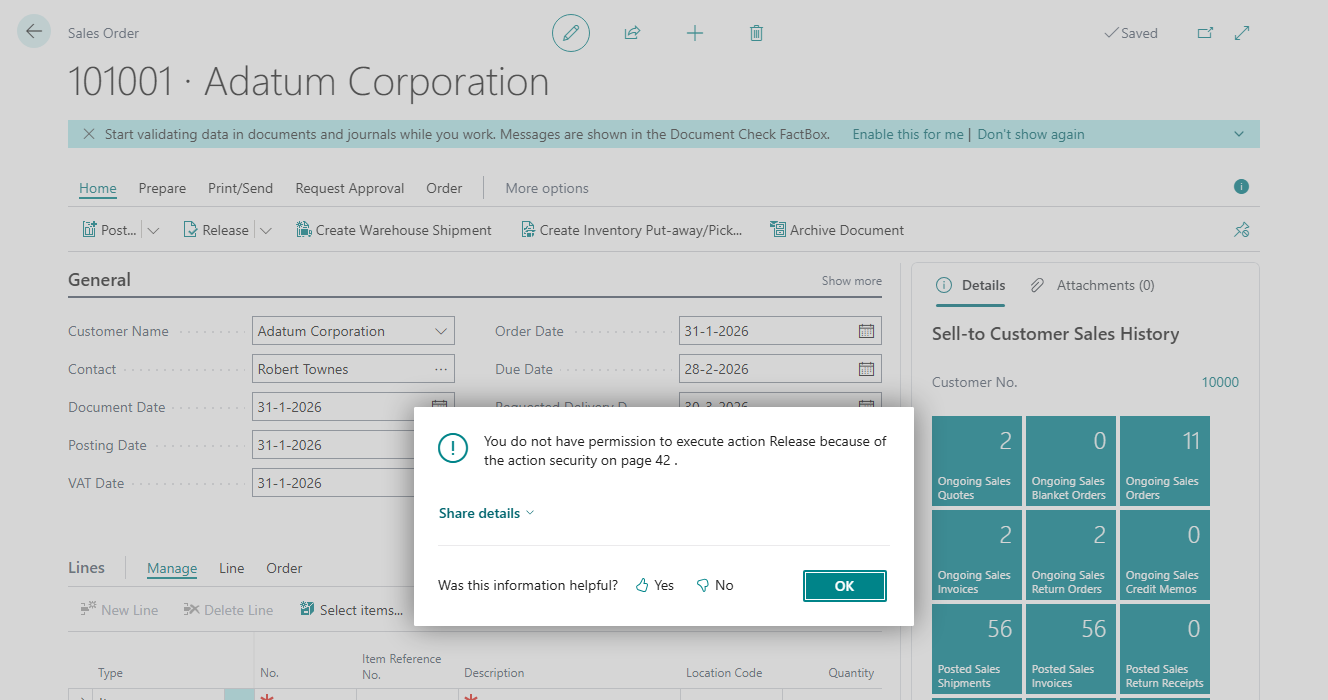
The message a user sees when Release is blocked.
For the link you can also set a company, a starting date and an ending date. See Link permission sets.
¶ Good to know
- You cannot delete, rename or change the description of the Action Securities that come with the app.
- The list is filled when you load the default data. See Load the default data.
- Action Security works only for the actions in the list. To secure an action on a custom or add-on page, or to ask for a new standard action, see Customization for developers.
- Users need the permission set
2C FIELDSEC USE. - Without a valid trial or license the app does not block actions. See Limits.
- Check who is blocked. Link the permission set, sign in as a test user and press the action.
If you have a suggestion for a new Action Security, send it to support@2-controlware.com.