Compliance Field Security adds three kinds of control that standard Business Central does not have. Standard permissions work per table, so anyone who may edit a record may edit every field in it. Standard Business Central also cannot show a user only part of a table, and it cannot block one action on a page. Field Security closes these gaps, and the data owners can set up the rules themselves, without code.
¶ Why is it important
Standard permissions give a user a whole table, a whole page or none of it. Real work is finer: Anna may post the order but not change the payment terms, the salesperson may see only their own orders, and only the finance team may release. Field Security closes that gap, without code:
- Fewer mistakes and less fraud: critical fields such as posting groups or job titles can be changed only by the people who own them.
- Segregation of duties: you can split a table between departments, for example by document type, and block single actions such as Release.
- Data owners keep control: you set up the rules in Business Central, and the changes to your rules are logged. See Reference.
Transcript of this video
Compliance Field Security, by 2-Controlware. Control who can change, see and do what in Business Central, without code. Three features, one tour. First, fields. Anyone who may edit an employee can change the job title. Standard Business Central cannot protect just that one field. So the title is changed, and saved. Nobody is asked why, and nothing is stopped. With Field Security, you secure one field of one table. Here, the job title of the employee. Everything else on the employee stays editable. Only that one field is locked. You write the message people will see, so they know who to ask. And you choose who is locked out, by linking permission sets. After the next sign-in, the rule is active. Same user, same employee, same field. Now the same user tries the same change. It is refused, with the message you wrote yourself. Nothing is saved. Second, records. Everyone who opens the employee list sees every employee. Whatever the department, and whether it is their business or not. Filter Security cuts a table into parts. Here, the employee table. The line says which records are visible: only those where the job title starts with production. Plain filters and wildcards are enough. No programming is needed. You set a starting date, and the rule is active from that day. Then you link the permission sets that get this limited view. After the next sign-in, the same user sees only the two production employees. The other records are not deleted. They are simply out of sight, for this user. Third, actions. Some actions are too important for everyone. Business Central cannot switch off a single button. Action Security can. Take the release action on the sales order. Today every user may press it. Open the permission sets linked to this action. Add the permission set of the users who may not release orders. Pick the set from the list, and confirm. Nothing else is needed. From now on the action is blocked for everyone with this permission set. After the next sign-in, a user opens an order that is still open. The user presses release. Business Central stops the action and tells the user why. The order stays open. Fields, records and actions, locked down by permission set. Compliance Field Security, by 2-Controlware. Try it for thirty days.
Product demo (3.5 minutes): lock one field, show a user only part of a table, and block the Release action, all by permission set and without code.
¶ How it works
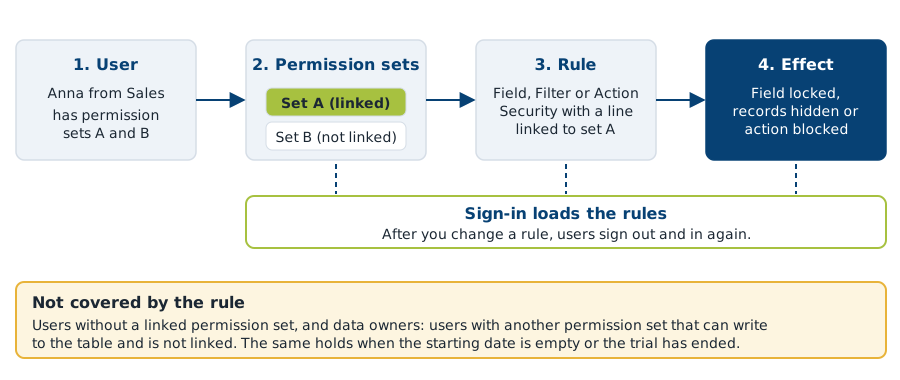
In short: you link a rule to permission sets. The rule applies to every user who has one of those permission sets. The rules are loaded when the user signs in.
Inside the app the three features are called Field Security, Filter Security and Action Security.
- Field Security locks fields for chosen users. Example: only Human Resources may change the Job Title on the Employee Card. See Lock fields with Field Security.
- Filter Security lets a user see, or edit, only part of a table, based on a filter. Example: a user sees only the employees of the Production department. See Hide records with Filter Security.
- Action Security blocks actions on pages for chosen users. Example: only the finance team may release sales orders. See Block actions with Action Security.
¶ What you can do
| I want to ... | Use | Page |
|---|---|---|
| Lock one field, such as Job Title, for most users | Field Security, Default Editable on | Lock fields |
| Let a user fill in a field once, but not change it afterwards | Field Security with Initial Field Entry Allowed | Lock fields |
| Allow users to edit only a few fields of a table | Field Security, Default Editable off | Lock fields |
| Hide the records of other departments | Filter Security, type Visible | Hide records |
| Let a user edit only the records that match a filter | Filter Security, type Editable | Filter Security |
| Show each salesperson only their own orders | Filter Security with a calculated filter | Filters |
| Block Release (or another action) for some users | Action Security | Block actions |
| Know who is covered by a rule, and who is not | Effective Securities | Effective security |
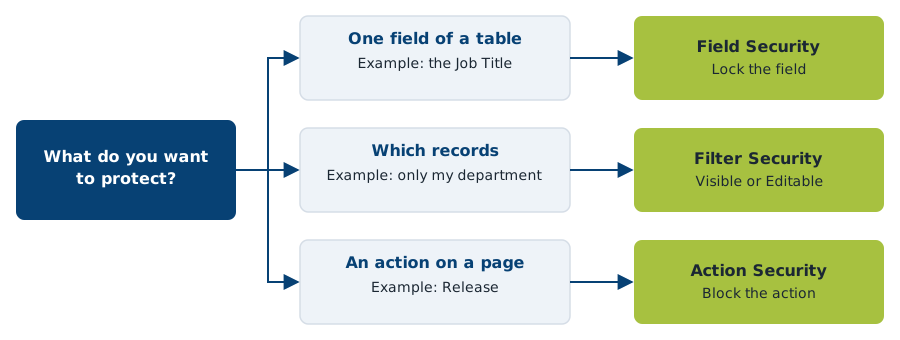
Not sure where to start? Follow the quick start on Set up.
¶ What you need
- Microsoft Dynamics 365 Business Central, online (SaaS) or on-premises. For supported versions see the release notes.
- The app Compliance Field Security. It depends on Compliance Essentials, which is installed with it at no extra cost.
- A registration after every new installation. You get a trial first, then you need a license. See Install and set up Field Security.
- The permission set
2C FIELDSEC MANAGEfor the people who maintain the rules. Every user needs2C FIELDSEC USE(what is this?). The setup wizard can assign it to all existing users. You assign it yourself to users you create later.
Without a valid trial or license the app does not apply your rules. See Limits before you rely on a rule.
¶ Where to go next
- Set up: install, register, link permission sets, a ten-minute quick start and the go-live checklist.
- Fields, Filters and Actions: the three features.
- Calculated filters and Table relations: advanced functions for filters that depend on the user or on a related table.
- Reference: how rules combine, setup switches, limits and notes for developers.
- Examples, including rules created with Copilot, and the FAQ.
Terms are explained in the Glossary. For general problems see Troubleshooting.
¶ Help, other solutions and services
Questions or a problem? See Support and contact for support@2-controlware.com and the support process. For monitoring authorizations across environments, see the Authorization Box from 2-Controlware. For implementation, audit experience and consultancy, see 2-Control.nl.
Last reviewed: October 2026.