Advanced functionality. A table relation tells Field Validation how two tables are connected. Table relations are shared with Field Security through Compliance Essentials.
When you choose Load Default Data on the Field Validation Setup page, a set of table relations based on standard Business Central is added. You can use them and study them as examples for your own relations.

¶ Create a table relation
- Search for Table Relations List and choose New.
- In No., enter a number for the relation. For a relation between the tables 39 and 14, you could use
T39-T14. - In the first Table field, choose the table you want to set the validation for. In the second field, Related Table, choose the table that is the source of the validation. The description shows the names of both tables.
- Business Central fills the lines with the fields that link the two tables (the primary key). Remove fields to base the relation on fewer fields, or keep all the fields that must be related.
- Optional: limit the records of the related table with a condition. Choose Conditions at the end of the line. In Field No., use AssistEdit to select the field to filter on, and enter the value in Filter. Choose Close.
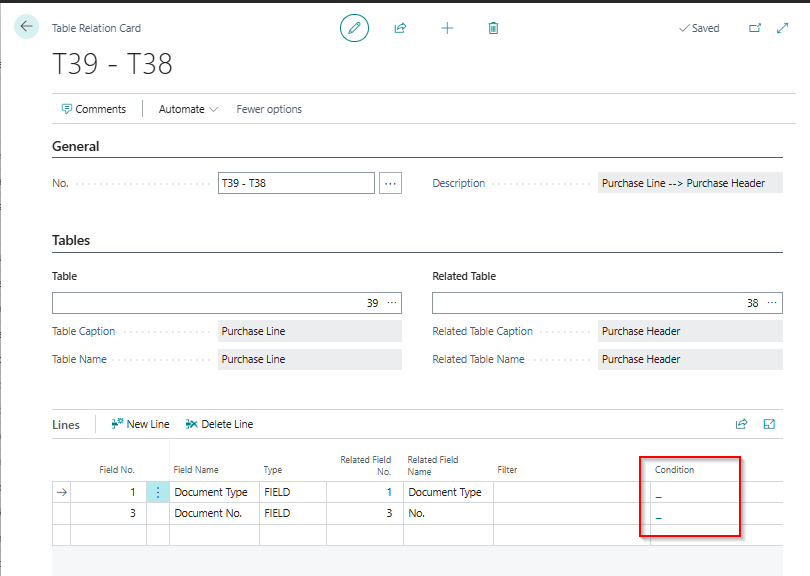
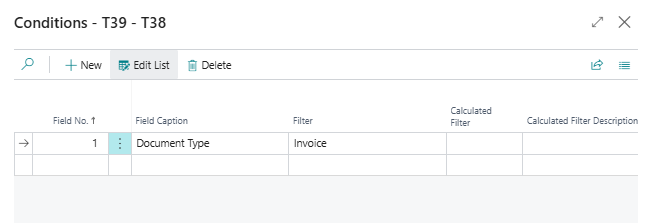
The result is a relation that you can select in the Table Relation No. field of a validation line, or in the conditions and actions of a validation.
¶ Conditions and constants
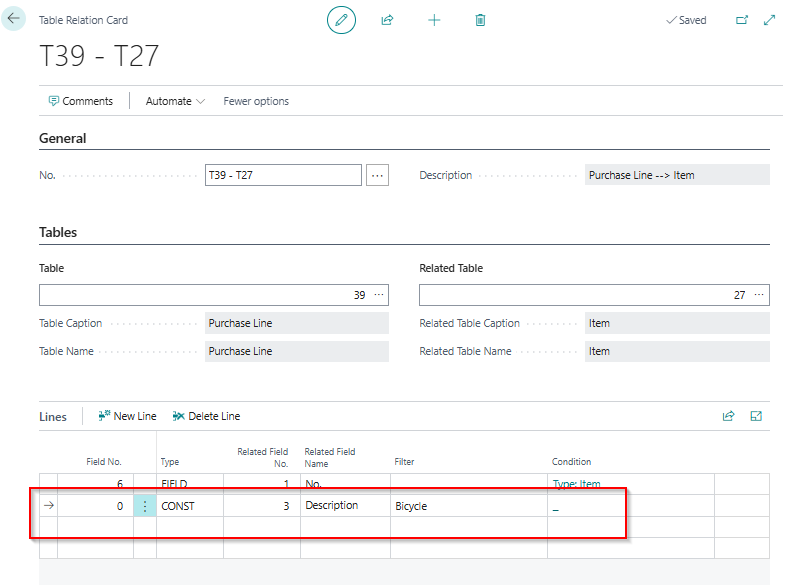
A line of a table relation has the type FIELD or CONST.
- FIELD links a field of the table to a field of the related table.
- CONST uses a constant instead of a field. Enter the field of the related table and the constant value in Filter. In the example below, the relation only applies to the item whose description is "Bicycle".
¶ Example: validate sales lines when an order is released
In this example, we want the type of a sales line to be Item and the description to be filled in. The validation is set up on the sales line (table 37) and uses a table relation to the sales header (table 36). It runs when the status of the sales header changes from Open to Released.
Standard Business Central checks only a fixed set of fields when you release a document. With a table relation, you set your own rules for the header and the lines, without code.
Transcript of this video
Validate sales orders at the moment they are released. Header and lines, without code. Before an order is released, the data must be right. The external document number starts with the year and month. The posting date is today or later. Name and address are filled in. And every item line has a quantity, a price, a location, and the right description. Standard Business Central checks a fixed set of fields on release. Your own rules mean custom code, for every rule. With Field Validation, you set these rules per table, without code. This validation is for the sales header, table thirty-six. The type is Error, so a record that breaks a rule is stopped. The key setting is the condition. The rules only run when the status is not Open, so a draft stays free to edit. The starting date switches the validation on. The lines hold the rules. A regular expression checks the document number: year and month, a dash, then anything. The posting date may not be before today. Customer name and address are mandatory. The same for the lines: table thirty-seven, the sales line. Only item lines are checked. And a table relation to the header gives each line the status of its order. With that relation, the line rules also run when the order header changes. A starting date switches it on. Quantity and unit price must be above zero. The description must equal the description on the item, a related field rule across tables. And the location is mandatory. Rules load at sign-in, so we sign in again. Now we test with an order that breaks the rules. We release the order. It is stopped. The header rules and the line rules both fire, and every problem is listed with the message we wrote. The user corrects the document number, the posting date, and the address. And then the quantity and the location on the lines. Release once more, and it goes through. The same works on any table, as a warning or an error, per company or permission set. Field Validation, by 2-Controlware. Better data, without code.
Video (3 minutes): validation rules on the sales header and the sales lines, set up with the validation type Error. A sales order that breaks the rules cannot be released. All findings are listed with the messages you wrote, and after the corrections the order is released.
The two variants share steps 1 to 4. They differ in the validation type and in what happens to the order.
- Create a validation for the table Sales Line.
- Add the rule lines. Here: a Mandatory rule on the field Description, and a Filter rule on the field Type with the value Item.
- Set the Conditions with the table relation from the sales line to the sales header: the field Status with the filter
<>Open. The validation now only runs when the header is not open. - Select Execute validation on Related Table modifications on the condition. Without this setting, the line rules do not run when the header changes, so they do not run on release.

When you enter a table relation, Business Central may ask for a confirmation ("Your change might update related records"). Choose Yes.
¶ Variant A: Error, as in the video
- Set the Validation Type to Error.
Release a sales order that does not meet the rules. The rules are checked, the findings are shown on the Field Validation Results page, and the release is reversed: the order stays open until the lines are corrected. This is the strictest variant and the one in the video.
¶ Variant B: Warning with an action
- Set the Validation Type to Warning.
- Set the Action after Validation: change the field Status of the related sales header to Open. If the rules are not met, the status of the sales header changes back to Open.
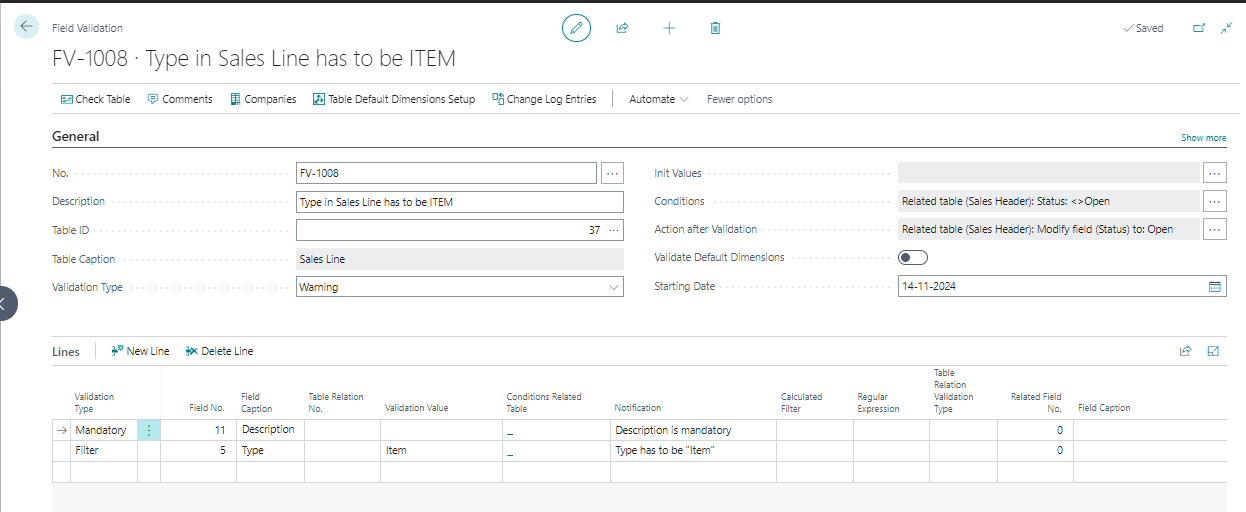
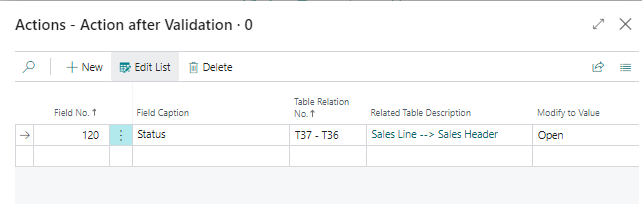
Release a sales order that does not meet the rules. The findings are shown on the Field Validation Results page. The user is informed, and the action puts the status of the header back to Open.
Action after Validation is only available with the validation type Warning. With the type Error, the modification of the record is reversed instead. See Warning or error.
For a complete example with rules on the header and the lines, see Recipe: block releasing a sales order.
Last reviewed: October 2026.