Advanced functionality. A calculated filter is a value that Field Validation works out at the moment a rule runs, so you do not need a rule per user or a fixed date. Calculated filters are shared with Field Security through Compliance Essentials.
¶ What a calculated filter can use
A calculated filter has a Type:
- Date Formula: a date filter, written as a Business Central date filter, for example
pfor the current accounting period. - System Variable: the User ID, the User Security ID or the Current Company.
- Related Field: a value of the signed-in user in a related table. Choose a table relation that starts at one of three tables: User Setup (table 91, found by user ID), Resource (table 156, found by the time sheet owner) or User (table 2000000120, found by user security ID). Then choose the Filter Field whose value is used.
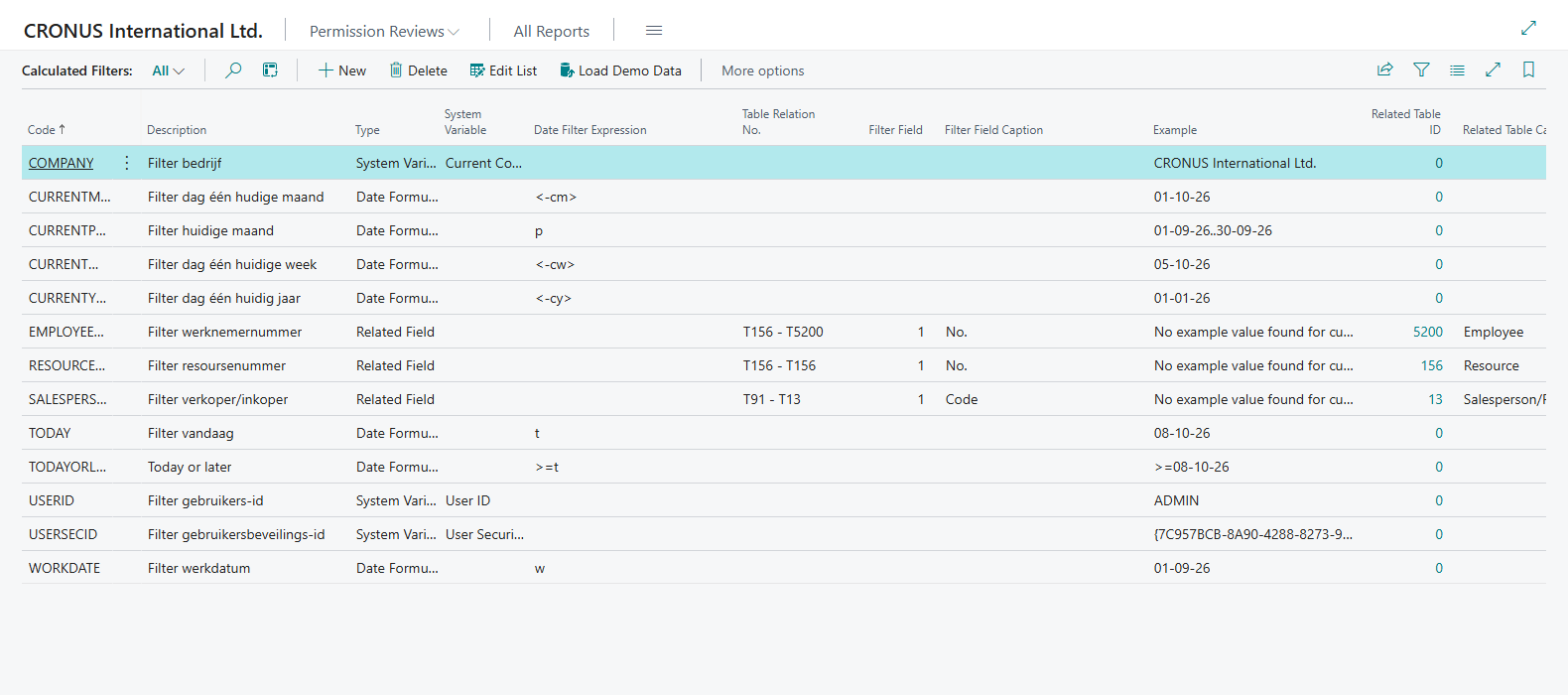
Search for Calculated Filters to see the list. The Load Default Data action on the Field Validation Setup page imports a set of calculated filters. You can add your own filters on this page.
¶ The default filters
| Code | Type | Expression or relation | What it filters on |
|---|---|---|---|
TODAY |
Date Formula | t |
Today |
WORKDATE |
Date Formula | w |
The work date |
CURRENTWEEK |
Date Formula | <-CW> |
Day one of the current week |
CURRENTMONTH |
Date Formula | <-CM> |
Day one of the current month |
CURRENTYEAR |
Date Formula | <-CY> |
Day one of the current year |
CURRENTPERIOD |
Date Formula | p |
The current accounting period |
USERID |
System Variable | User ID | The User ID of the signed-in user |
USERSECID |
System Variable | User Security ID | The User Security ID of the signed-in user |
COMPANY |
System Variable | Current Company | The current company |
SALESPERSONNO |
Related Field | User Setup to Salesperson/Purchaser | The salesperson or purchaser code of the user |
EMPLOYEENO |
Related Field | Resource to Employee | The number of the employee that is linked to the resource of the user. The relation matches the Resource No. of the resource with the Resource No. on the employee |
RESOURCENO |
Related Field | Resource to Resource | The resource number of the user |
¶ Day one versus the whole period
CURRENTWEEK, CURRENTMONTH and CURRENTYEAR each give one date: the first day of the week, month or year. Used on a date field, the field must be equal to that day. That is rarely what you want for an order date.
For a range, use CURRENTPERIOD. The expression p is the date filter for the accounting period that applies, so you get the whole period, for example 1 October 2026 to 31 October 2026 when your periods are months. It needs accounting periods that are defined for the date, so check Accounting Periods first. It is only "this month" when your accounting periods are calendar months.
| Code | Example result on Thursday 8 October 2026 |
|---|---|
TODAY |
8 October 2026 |
CURRENTWEEK |
5 October 2026 (Monday) |
CURRENTMONTH |
1 October 2026 |
CURRENTYEAR |
1 January 2026 |
CURRENTPERIOD |
1 October 2026 to 31 October 2026, with monthly accounting periods |
¶ Create your own calculated filter
- On the Calculated Filters page, choose New.
- Enter a Code and a Description, and set the Type to Date Formula.
- In Date Filter Expression, enter the filter, for example
<-CM>..<CM>for the first to the last day of the current month. - Check Example Date Filter. It shows what the expression gives today.
For a Related Field filter, choose the Table Relation No. and the Filter Field. Example Filter Field shows the value for the signed-in user, or says that no example value was found for the current user.
¶ Create a calculated validation
- Open the validation, or create a new one. See Create a validation.
- In a line, set Type to Calculated.
- Select the field that must be validated.
- In Calculated Filter, use the AssistEdit button and select the filter.
- Set a Starting Date of today or earlier, and sign in again.
¶ Example: order date in the current accounting period
The validation in this example works on the sales header. It has the condition that the status is Open, and one line of the type Calculated on the Order Date with the calculated filter CURRENTPERIOD. When the order date is not in the current accounting period and the order has the status Open or changes to Open, an error occurs.
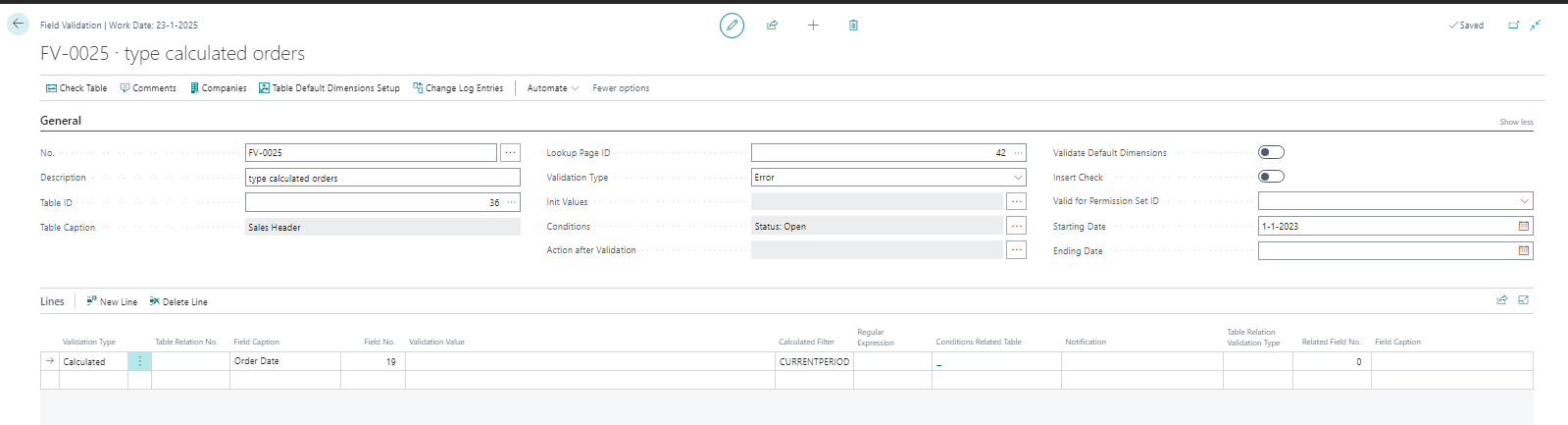
The default message says: Field Order Date must apply to Filter current month. That text is the description of the default CURRENTPERIOD filter. If your accounting periods are not months, write your own text in the Notification field of the line.
Remember that a validation is only active from its starting date, and that users must sign in again after you set one up. See Create a validation.
Last reviewed: October 2026.