Compliance Advanced Permissions Management (APM) records every change to your Business Central permission sets, including changes that an app update makes to system sets. You review those changes in periods, see who is affected before you change a set, and restore a user-defined set after a mistake. APM works next to the standard permissions and does not change how Business Central evaluates them.
¶ Why is it important
Permissions decide who can see and change your financial data. An administrator can change a permission set at any moment, and app updates can change system permission sets too.
- Standard Business Central logs changes to permission sets you created yourself. That log is technical and not built for review.
- Changes to system permission sets, for example by an app update, are not logged at all.
For an auditor, and for anyone responsible for internal control, this is a weak spot. It is hard to show that access was under control if you cannot easily show what changed, who changed it, when, and what was concluded about it.
Transcript of this video
Who changed this permission? When? And did anyone ever review it? These are the questions every auditor asks, and they are hard to answer. Standard Business Central logs changes to your own permission sets in a technical log that is not built for review. Changes to system permission sets are not logged at all. Yet any administrator, and any app update, can change permissions at any time. Advanced Permissions Management, by 2-Controlware, turns that information into something you can read, review, and act on. This is your starting point: the role center. It tells you at once how many permission changes are waiting for review. See how many permission sets you have, which ones are in use, and which carry broad permissions. And follow your reviews: unreviewed changes, open reviews, and completed reviews. Start with the dashboard. It lists every permission set, how many permissions it contains, how often it changed, and how many users depend on it. Every change is counted the moment it happens, so nothing slips by unnoticed. Watch what happens when we change something. In standard Business Central, we add delete permissions to a sales permission set, just like an administrator would. Back in the dashboard, the change is already counted, without anyone having to report it. The change log shows who did it, when, and exactly what changed, before and after. Nothing to configure, and nothing to interpret. The same applies to the system permission sets that Microsoft and apps provide, which standard Business Central does not log at all. When an app update widens access, it is recorded and attributed to the update, instead of slipping through unnoticed. Who last touched the vendor permissions? One click shows a name and a date on every line, so you always know who to ask. Version compare puts any two moments side by side, so you can see how a permission set looked before and after, even across a baseline reset. History is archived, never lost. Then comes the part auditors ask for first: review. Group the recent changes into a review period, and work through them as a queue. Flag a change as suspicious, and record your decision: a mitigating control, or the action to change the permission. and close the session. A review does not block a change, but it is your permanent record that someone looked, and what they concluded. Quality analysis checks your permission sets against fixed rules, so you do not have to read every line yourself. Both of these sets give access to every table. The legacy set is critical. The base layer is not critical: excluded permissions limit its broad access, so it is scoped and only a warning. Same pattern, real difference in risk. Open one set for the detail, and every finding is explained. This wildcard on all table data is the real problem: it grants write access to every table. The other lines show which objects are affected, their business domain, and why they were flagged. Planning a change? Simulate it first. Remove a permission from a set, and let the analysis show what would happen. Removing read access to items from one small lookup set affects nine permission sets and four users. You see that, and exactly who is affected, before anything is saved. And if a mistake does get through, you can roll back user-defined sets to the previous version. Preview exactly what will be removed, confirm, and it is done. The rollback itself is logged too, so the audit trail stays complete. Advanced Permissions Management for Business Central. Every permission change visible, explainable, and reversible. Start your thirty-day trial today.
Video (5 minutes): the dashboard, change tracking, history, review, quality check, what-if analysis and rollback.
¶ How it works
APM makes every permission change:
| Principle | What it means in practice |
|---|---|
| Visible | Every change is recorded at the moment it happens, including changes from an app update. The audit evidence is a by-product of normal work. |
| Explainable | For every change you see who made it, when, and what was different before and after. A period review adds the conclusion: Reviewed or Flagged, with a comment that says why. |
| Reversible | You can test the effect of a change before you make it, check sets for risky patterns, and restore an earlier version when something goes wrong. |
The habit behind it: record continuously, review regularly, keep the review as evidence.
A review is an evidence record, not a gate. Business Central cannot hold back a permission change until someone has reviewed it, so a change is already live when you look at it.
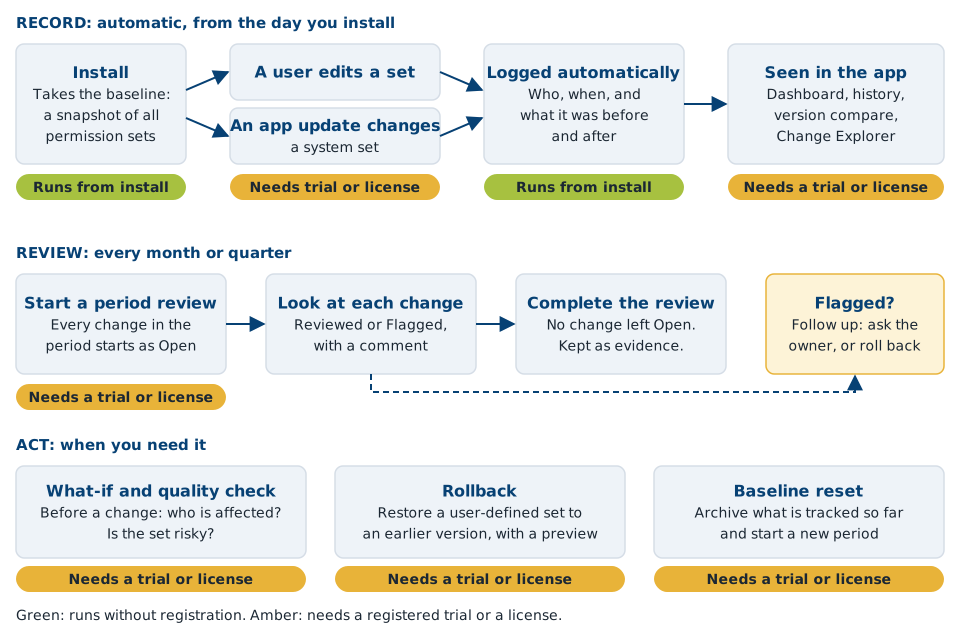
In words: on installation APM takes a baseline, a snapshot of all permission sets. From then on, every change by a user or by an app update is logged with who, when, and the permissions before and after. You look at the changes in the dashboard, the history and the Change Explorer, and you go through them in a period review. Before a risky change you run a what-if analysis. After a mistake you roll back. When you want a clean period, you reset the baseline and the old data is archived.
¶ What you can do
| I want to... | Go to |
|---|---|
| Start quickly, and know what to do each month | Set up |
| See all permission sets, who changed a permission, and compare versions | Track & review |
| Review the changes of a period and sign them off | Track & review |
| Find changes caused by app updates | Track & review |
| Undo a mistake in a permission set, or start a clean tracking period | Track & review |
| Build a clean set of permission sets, with names from Copilot | Generate sets |
| Find out who is affected before I change a set, and find risky sets | Analyze |
| Show an auditor what happened | Audit |
| See a worked example | Examples |
All pages of the app open only with a registered trial or a license. Recording itself starts at installation. See Set up.
¶ What you need
- Business Central online. APM is available for the cloud only. On-premises is available on request: contact support@2-controlware.com. For the supported Business Central versions, see the release notes.
- Compliance Essentials, the shared library of the Compliance apps. It is installed automatically with APM at no additional cost. See Compliance Essentials.
- Permissions. The person who sets it up needs the SUPER permission set. Every other user needs Use Advanced Permissions Management. See the FAQ.
- A trial or license. Register once to start a free trial of 30 days. See Set up.
¶ Works with the other Compliance apps
If Field Security (including Filter Security and Action Security) or Field Validation is installed, APM detects it automatically. The Role Center shows extra counters, the dashboard shows extra columns per permission set, and the quality check points out where a companion app could close a gap. Without those apps, nothing extra appears.
Want to build a permission set from what a user actually does? Use the Advanced Permissions Recorder, a free app. Record a set with the Recorder, and APM then tracks every later change to it. The Recorder itself works without APM.
¶ Where to go next
- Set up: install, register, wizard, settings and a ten-minute quick start.
- Track & review, Generate sets, Analyze and Audit: the core functions.
- Reference: settings, roles and permissions, limits and the comparison with standard Business Central.
- Examples and the FAQ.
¶ Help, other solutions and services
Questions or a problem? See Support and contact for support@2-controlware.com and the support process. For monitoring authorizations across environments, see the Authorization Box from 2-Controlware. For implementation, audit experience and consultancy, see 2-Control.nl.
Last reviewed: October 2026.