Compliance Inventory Reconciliation is an app for Business Central that compares your inventory and work in progress with the general ledger, account by account. When you see a difference, the app helps you find where it comes from.
¶ Why is it important
In standard Business Central, it is very difficult to monitor the reconciliation of inventory and work in progress. When differences appear, you get almost no insight into them. Inventory Reconciliation analyzes the subledger (value entries) and the general ledger, and shows the result per general ledger account in user-friendly pages. Finance teams and controllers can then explain every difference instead of searching for it.
¶ How it works
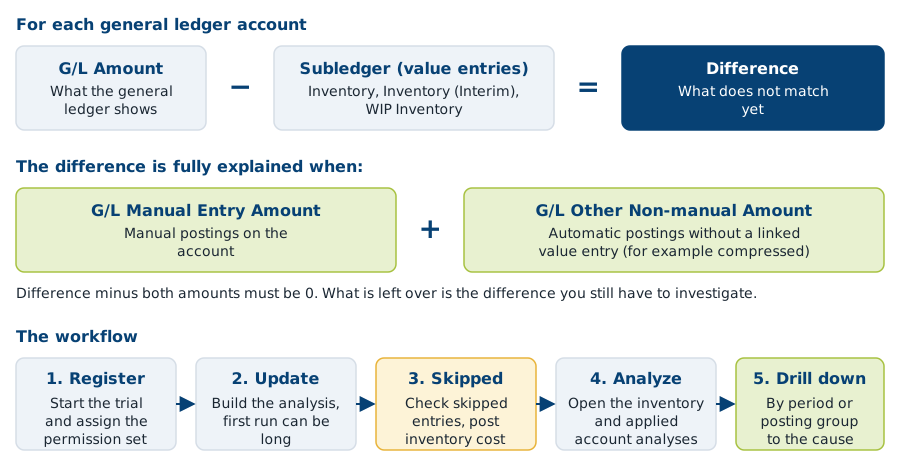
In words: for each general ledger account, the app takes the amount of the subledger and the amount of the general ledger. The Difference is what does not match. The app splits that difference into manual postings (G/L Manual Entry Amount) and automatic postings it cannot link to a value entry (G/L Other Non-manual Amount). When these two together equal the difference, the account is fully reconciled. You work in five steps: register the app, run Update, check the skipped entries, analyze the accounts, and drill down per period or posting group to find the cause.
¶ What you can do
- Reconcile inventory accounts with the general ledger. See Reconcile.
- Reconcile applied accounts (the result accounts, such as sales, purchase and production variances) with the general ledger. See Reconcile.
- Compare the situation at posting time (Used Setup of Posting Groups during posting) with the current posting group setup (Setup of current Posting Groups).
- Trace a difference to a period or a posting group.
- Update the analysis automatically at night. See Set up.
- Look up every field, action and report in the reference.
¶ What you need
- Compliance Inventory Reconciliation and its base app, Compliance Essentials. For the supported Business Central versions, see Supported Business Central versions.
- Registration after each installation. A trial starts at registration. During the trial the analysis stops at an ending date. For the length of the trial and how to get a license, see Licenses and Install and set up Inventory Reconciliation.
- The permission set Use Inventory Reconciliation (
2C IR RECONCILIATION) for every user. - Defined accounting periods that cover the posting dates of your entries.
¶ Where to go next
- Set up: install, register, wizard, permission set, the update job and the go-live checklist.
- Reconcile: run the analysis and explain differences, for inventory accounts and applied accounts.
- Reference: setup fields, actions, filters, reports and skip reasons.
- The FAQ: slow update, skipped entries, a difference that does not reach zero. See also Getting started for licenses and AppSource links of all apps.
¶ Help, other solutions and services
Questions or a problem? See Support and contact for support@2-controlware.com and the support process. For monitoring authorizations across environments, see the Authorization Box from 2-Controlware. For implementation, audit experience and consultancy, see 2-Control.nl.
Last reviewed: October 2026.