Control who can change what in Microsoft Dynamics 365 Business Central, and prove it.
Five apps from 2-Controlware. Install only what you need, online or on-premises.
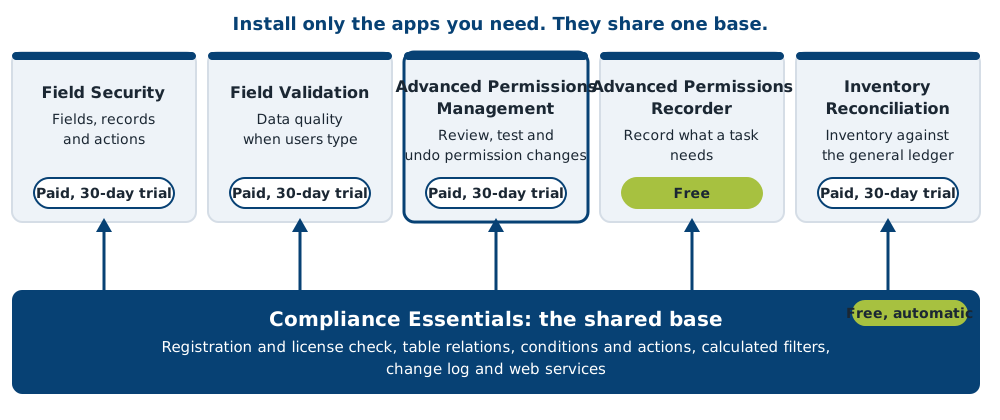
¶ Compare the apps
| App | Free or paid | Online and on-premises | Minimum Business Central | Best for | Start here |
|---|---|---|---|---|---|
| Compliance Field Security | Paid, 30-day trial | Both | Supported versions | Locking fields, hiding records and blocking actions per permission set | Field Security |
| Compliance Field Validation | Paid, 30-day trial | Both | Supported versions | Data quality: check values when users enter them | Field Validation |
| Compliance Advanced Permissions Management | Paid, 30-day trial | Online only (on-premises on request) | 27 or later | Reviewing, testing and undoing permission changes, with evidence for auditors | Advanced Permissions Management |
| Compliance Advanced Permissions Recorder | Free | Both | Supported versions | Finding the permissions a task needs | Advanced Permissions Recorder |
| Compliance Inventory Reconciliation | Paid, 30-day trial | Both | Supported versions | Explaining differences between inventory and the general ledger | Inventory Reconciliation |
All apps use the free base app Compliance Essentials. It is installed automatically with each app. Not sure about licenses or the install steps? Read Getting started.
¶ Which situation is yours?
| Your situation | Use | Start here |
|---|---|---|
| An auditor asks who changed permission set X, and when. | Advanced Permissions Management | Advanced Permissions Management |
| Users must not edit the Credit Limit, but must still edit the rest of the customer. | Field Security | Field Security |
| A postal code must match the country, or the user gets a warning. | Field Validation | Field Validation |
| A new role needs exactly the permissions of one task, not a guess. | Advanced Permissions Recorder | Advanced Permissions Recorder |
| Inventory on the balance sheet differs from the inventory subledger. | Inventory Reconciliation | Inventory Reconciliation |
¶ What is new
See What's new for the latest release and the release notes for every release.
¶ Start by your role
| I am... | I want to... | Go to |
|---|---|---|
| An administrator | Install, register and license an app. | Getting started |
| An administrator | Fix a problem. | Troubleshooting |
| A key user or data owner | Set up rules in Business Central. | Field Security or Field Validation |
| A partner | Check granules, versions, upgrades and web services. | Information for partners |
| An auditor or controller | See which evidence each app produces. | Compliance evidence |
| Anyone | Watch the apps at work. | Videos |
¶ Where to go next
- Getting started: choose an app, install it and register it.
- Release notes: what changed per release, and which Business Central versions are supported.
- Glossary: terms used in the Compliance apps.
- Troubleshooting: answers to common problems.
¶ Support and contact
When you buy a 2-Controlware solution, a service level agreement (SLA) applies. It says that your Microsoft Dynamics partner gives first line support, unless agreed otherwise. The SLA is active as long as the annual maintenance fee is paid. If your partner cannot answer the question, email support@2-controlware.com to create a ticket. We answer every ticket within 24 hours. Include the app, the version number and your Business Central version.
- Software support: the support process, manuals, the support request and remote support.
- Partner portal: for partners, to sign in and get builds and downloads. See Information for partners.
- Questions about licenses or prices? Email sales@2-controlware.com.
Supported Business Central versions for on-premises: see Release notes.
¶ More from 2-Controlware and 2-Control
- Authorization Box from 2-Controlware solves a different problem than these apps: it manages and monitors authorizations across your Microsoft Dynamics environments, with central management, continuous monitoring and user templates. It can read data from Business Central through Compliance Essentials. See Authorization Box.
- 2-Controlware.com: all software of 2-Controlware, news, events and the whitepaper on authorizations in Business Central.
- 2-Control.nl: implementation services, audit experience and consultancy for Business Central, authorizations and internal control.
¶ Older products
Looking for 2-Controlware for Dynamics NAV? See the notice about 2-Controlware 10.03.
Last reviewed: October 2026.